.png)


.png)
Direct ordering: what it is, what it isn’t, and why it wins in 2026
Direct ordering, in this playbook, means direct online ordering for restaurants—orders placed on restaurant-owned channels (your website, branded web app/app, QR ordering, and Google/Maps experiences) where you control the guest experience, capture first-party data with consent, and route orders into your operations/POS without marketplace intermediation.
Not about live TV/radio “en direct,” and not about banking “direct” login portals. If you can change the menu, see the customer, and control the handoff, you’re in direct ordering territory. “Direct” isn’t a vibe—it’s a system.
Who this guide is for: restaurant operators, GMs, and marketing/ops leads who want to grow commission-free sales, own guest data, and increase repeat orders through owned channels.
If you arrived searching phrases like restaurant direct ordering, direct online ordering for restaurants, or commission-free ordering for restaurants, you’re in the right place. The rest of this section keeps “direct ordering” precise so the tactics later actually compound.
What direct ordering is (operator definition, not marketing)
Direct ordering is owned “surfaces” that push clean tickets into your kitchen and clean data into your database. The test is simple: you own the checkout and the guest record. In practice, that includes website ordering, a branded web app, sometimes a native app, QR codes that open your menu, and Google Business Profile actions that send guests into your ordering flow.
Map your stack to four operator questions. If you can’t answer these, you don’t yet have direct ordering—you have a link.
In our work at nabeeats.ai, we’ve seen operators “launch direct” and still miss the point because the POS never receives clean, auto-acknowledged tickets during rush. Direct ordering only works when it routes into real operations—POS/KDS, prep-time logic, and monitoring included. Tools like Toast POS, Square for Restaurants, and Google Business Profile can support that flow, but you still have to design it.
What direct ordering isn’t (and the hidden cost stack)
Direct ordering isn’t a single widget you slap on a homepage and forget. If your plan is “add an Order Online button,” you’ll underperform. The hard part is everything around the button: menu governance, ticket pacing, and exceptions when something breaks at 7:15 pm.
It also isn’t a magic “commission-free” switch. You don’t keep 100%—you shift where the costs live. Vendors that pitch “zero commission” often skip the operator math that determines contribution margin.
Marketplaces bake in commissions and marketing fees that scale with every order, while commission-free delivery economics shift spend toward payment processing, software, and fulfillment you can control. That’s why “commission free ordering restaurants” is less a slogan and more a design goal: keep variable platform take-rate out of the ticket, then manage the remaining costs like any other prime cost.
Use this quick cost-stack checklist before you compare channels:
We routinely see menu governance alone take 2–6 hours per week per location, and messy menu rules can cause ~1–4% of digital revenue to leak through errors or 86 mismatches (based on recurring audits across current client accounts). Direct ordering rewards operators who treat menu setup like an SOP, not a project.
Why direct ordering wins in 2026: identity + repeat engineering, not just fee savings
The durable advantage is first-party identity you can use—legally and operationally—to drive the next order. Your “win” isn’t saving a line-item fee; it’s building repeat on purpose. When you know who ordered, what they ordered, and when, you can create reordering paths that don’t require discounting.
Fee savings still matter, but only when they compound into better retention. Commission-free delivery is most powerful when it funds better experience—faster handoff, clearer ETAs, and fewer mistakes—so guests choose you again without a marketplace nudge. That’s how you protect contribution margin while also owning the guest relationship.
Here’s the counterintuitive part: you don’t need more customer fields. You need better timing triggers around operational moments. {#insight_3} A ready-time text that reduces uncertainty, a pickup confirmation that prevents “it wasn’t there,” and a 48-hour reorder nudge that hits when leftovers are gone will beat a birthday capture field almost every time.
Direct ordering channels compared: website vs app vs QR vs Google Business Profile
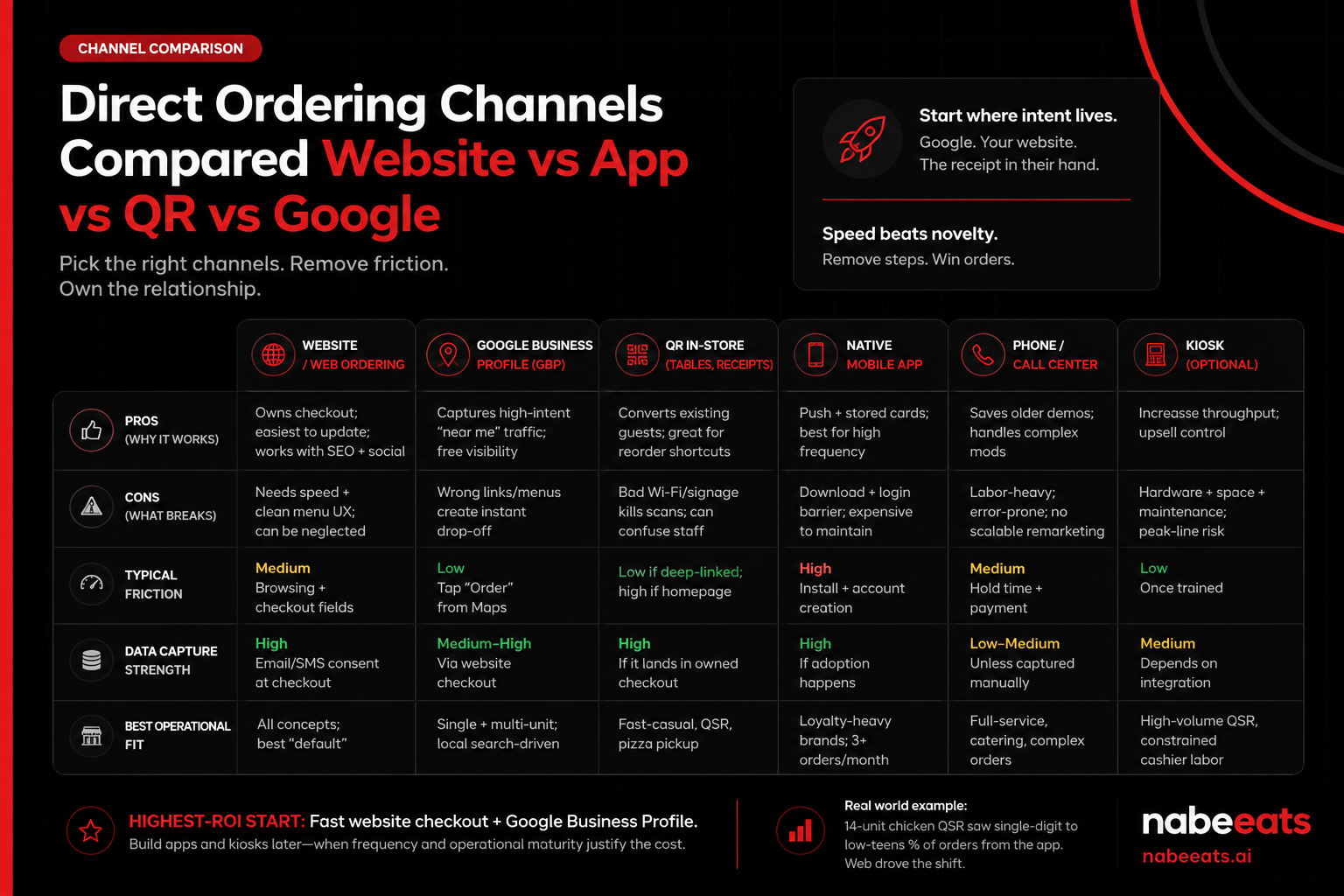
For most restaurants, the highest-ROI direct ordering stack starts with a fast, mobile-first website checkout plus a Google Business Profile (GBP)–optimized ordering link. Apps and kiosks come later when frequency and operational maturity justify the added friction and cost. Start where intent already lives—Google, your website, and the receipt in the guest’s hand—so “I’m hungry” becomes an order without extra steps.
In our work at nabeeats.ai, we’ve seen this with a 14-unit chicken QSR: over an 8-week launch, single-digit to low-teens % of direct orders came from the app, while web carried the shift away from marketplaces because guests could reorder in one tap via QR deep links. Speed beats novelty early—especially when customers order 1–3x/month, not 1–3x/week.
Direct ordering channel comparison table (what to prioritize first)
Use this table to allocate budget and effort based on friction, data capture, and operational fit. If you can’t maintain it weekly, don’t launch it—stale menus and broken links cost trust.
Channel / entry pointPros (why it works)Cons (what breaks)Typical frictionData capture strengthBest operational fitWebsite / web orderingOwns checkout; easiest to update; works with SEO + socialNeeds speed + clean menu UX; can be neglectedMedium: browsing + checkout fieldsHigh: email/SMS consent at checkoutAll concepts; best “default”Google Business Profile (GBP)/MapsCaptures high-intent “near me” traffic; free visibilityWrong links/menus create instant drop-offLow: tap “Order” from MapsMedium–High via website checkoutSingle + multi-unit; local search-drivenQR in-store (tables, receipts, bag stuffers)Converts existing guests; great for reorder shortcutsBad Wi‑Fi/signage kills scans; can confuse staffLow if deep-linked; high if homepageHigh if it lands in owned checkoutFast-casual, QSR, pizza pickupNative mobile appPush + stored cards; best for high frequencyDownload + login barrier; expensive to maintainHigh: install + account creationHigh (if adoption happens)Loyalty-heavy brands; 3+ orders/monthPhone / call centerSaves older demos; handles complex modsLabor-heavy; error-prone; no scalable remarketingMedium: hold time + paymentLow–Medium unless captured manuallyFull-service, catering, complex ordersKiosk (optional)Increases throughput; upsell controlHardware + space + maintenance; peak-line riskLow once trainedMedium (depends on integration)High-volume QSR, constrained cashier labor
Decision lens for picking a commission free online ordering system (or “no commission ordering platform”): don’t evaluate channels without evaluating vendor economics. A “web ordering” button can still hide per-order fees, payment markups, or delivery dispatch costs. Use the checklist below before you commit.
Selection lensWhat to askWhat “good” looks likeCommon gotchasFee modelIs pricing flat SaaS or per-order?Flat monthly + transparent add-ons“Low monthly” but per-order platform feesCommission label (self-qualify)Is it commission-free, low-commission, or marketplace commission?Commission-free = no per-order commission; low-commission = reduced % but still per-order; marketplace commission = full % + marketing fees“0% commission” while charging per-order “service” feesPayment processing pass-throughDo you bring your own processor? Are rates passed through at cost?Bring-your-own or pass-through with clear interchange + markupBundled processing with inflated effective ratesDelivery dispatch optionsCan you use in-house drivers, third-party dispatch, or both?Flexible: in-house + on-demand dispatch + pickup-only controlsForced dispatch partner with hidden per-delivery feesOwnership of guest dataWho owns email/SMS, order history, and consent?You own it; exportable; usable in your CRM/loyaltyVendor “owns” the relationship or restricts exportsPOS integrationIs it true two-way POS sync (menu + orders + throttling)?Real-time order injection + menu sync + item-level mapping“Integration” that’s just a printer or manual menu updates
Contrarian insight: don’t chase app downloads first (id=insight_1)
Chasing app downloads early is usually a distraction; improve web checkout speed and reordering paths first (id=insight_1). Apps don’t create loyalty—frequency does—and most brands don’t have enough repetition to justify the install hurdle. Do this for 30 days before you build an app: cut checkout fields, enable Apple Pay/Google Pay, and add a “Reorder last order” button on the first screen after a guest lands.
You already have web traffic from Google, Instagram, and QR. Every extra step creates drop-off, and install/login is the biggest step. Win the moment of intent, then earn the right to ask for an app later.
Google Business Profile as a “direct demand capture” layer
Google Business Profile is a direct demand capture layer because it turns brand search and “near me” discovery into a single-tap path to your owned checkout. GBP is a mobile-first channel, and one bad tap sends the guest to a marketplace (or a competitor). Google’s own Google Business Profile Help documentation emphasizes keeping menus and photos current and using performance insights—treat that like an SOP.
The #1 job is “Order Online” link hygiene: point the primary Order link to the exact ordering experience you want (not a generic homepage), and keep it stable. If you change providers, domains, or paths, treat GBP like a redirect project, because Google caches links across Search and Maps.
UTM tagging turns GBP into a measurable channel. Add UTM parameters to your GBP Order link (and, if used, your Menu link) so analytics can separate “GBP / organic” from other web traffic, then compare clicks to completed orders to see true conversion.
Treat GBP like a weekly checklist:
Common pitfalls that quietly kill GBP conversion:
Measurement note: track GBP clicks → menu views → add-to-cart → order completion, and review weekly; small fixes can lift conversion faster than a new promo.
One broken GBP link can erase a week of progress, because guests won’t hunt—they’ll bounce to the next listing.
Channel picks
Direct ordering conversion rate optimization (CRO): menu UX, modifiers, and checkout speed
The fastest way to raise direct ordering conversion is to reduce decision friction (fewer modifiers on top sellers), show clear order-ready expectations at the cart, and make checkout mobile-fast with express payments and minimal fields. If your funnel feels “fine,” your guests will still leak out at the seams—usually on modifiers, cart anxiety, and last-step fees.
Map Your Direct Ordering Funnel and Track the Right Metrics
Your direct ordering CRO funnel is simple: landing → menu → item detail/modifiers → cart → checkout → confirmation. If you can’t see drop-off by step, you can’t fix it, because “conversion rate” hides where guests actually quit.
Start with three operator-grade metrics you can pull from most ordering platforms (or via GA4 events if you’re tracking properly):
Here’s the contrarian part: don’t obsess over homepage clicks first. In our work at nabeeats.ai, the biggest gains show up after the menu loads (and yes, even for brands with great photography).
Audit Menu Architecture Like a “Path,” Not a PDF
Menu UX is navigation, not decoration. Your top 10 items should be reachable in 1–2 taps, especially on mobile, because guests don’t explore—they hunt.
Run this 10-minute audit on your phone:
One practical play: pin a “Most Popular” category to the top and keep it under 12 items. Food trucks and QSRs benefit the most, but fine dining takeout does too—because decision fatigue doesn’t care about price point.
Cut Modifier Sprawl on Top Sellers (This Is Where the Money Is)
Modifier discipline is conversion. Every extra choice adds friction and raises error risk, especially when you stack “sauce + spice + side + add-on + allergy note” on one screen.
We’ve seen this play out with a 6-unit fast-casual Mediterranean group in the Midwest (id=anec_1). Their direct site conversion sat at 1.4% for months; we lifted it to 2.3% in 5 weeks without discounts by cutting modifier sprawl by ~35% on top sellers and tightening option logic. The surprise? Less choice sold more food.
Use this framework on your five highest-volume items:
Balanced caveat: don’t over-prune for allergen-driven concepts; if you serve a lot of gluten-free or dairy-free guests, keep those toggles prominent and structured.
Add Order-Ready Time Messaging in the Cart (Kill Anxiety Before Checkout)
Order-ready time messaging is a trust cue. Show an honest “ready around X:YY” at the cart, not buried on the confirmation page, because uncertainty triggers abandonment.
Back to that same Mediterranean group (id=anec_1): adding order-ready time at the cart reduced checkout abandonment by 18%. Guests didn’t need a discount—they needed clarity (honestly, most operators hide this).
Do it like an operator:
Make Checkout Frictionless: Guest Checkout, Express Pay, Fewer Fields
Checkout speed is conversion speed. Default to guest checkout and offer Apple Pay/Google Pay, because forcing account creation is the fastest way to lose first-time intent.
Your non-negotiables:
Also: make tips and fees transparent before the final button. If a guest discovers a service fee only at the last step, they’ll bounce—then blame you, not the UI.
Optimize Mobile Performance and Accessibility (Pretty and Slow Loses)
Accessibility is usability. Readable type, big tap targets, strong contrast, and fast load times directly affect conversion, because most direct ordering sessions happen on phones.
First-party data for direct ordering: what to collect, consent, and retention automation
First-party data for direct ordering is the guest identity and order-history dataset you can legally use (with explicit consent) to trigger timely messages—like order-ready updates and 48-hour reorder nudges—that increase repeat orders without relying on discounts. If you can’t connect a guest to an order (with consent), you can’t automate repeat behavior. Keep it lean, keep it compliant, and make it operational.
Direct ordering implementation checklist: POS integration, operations, and marketplace-to-direct migration
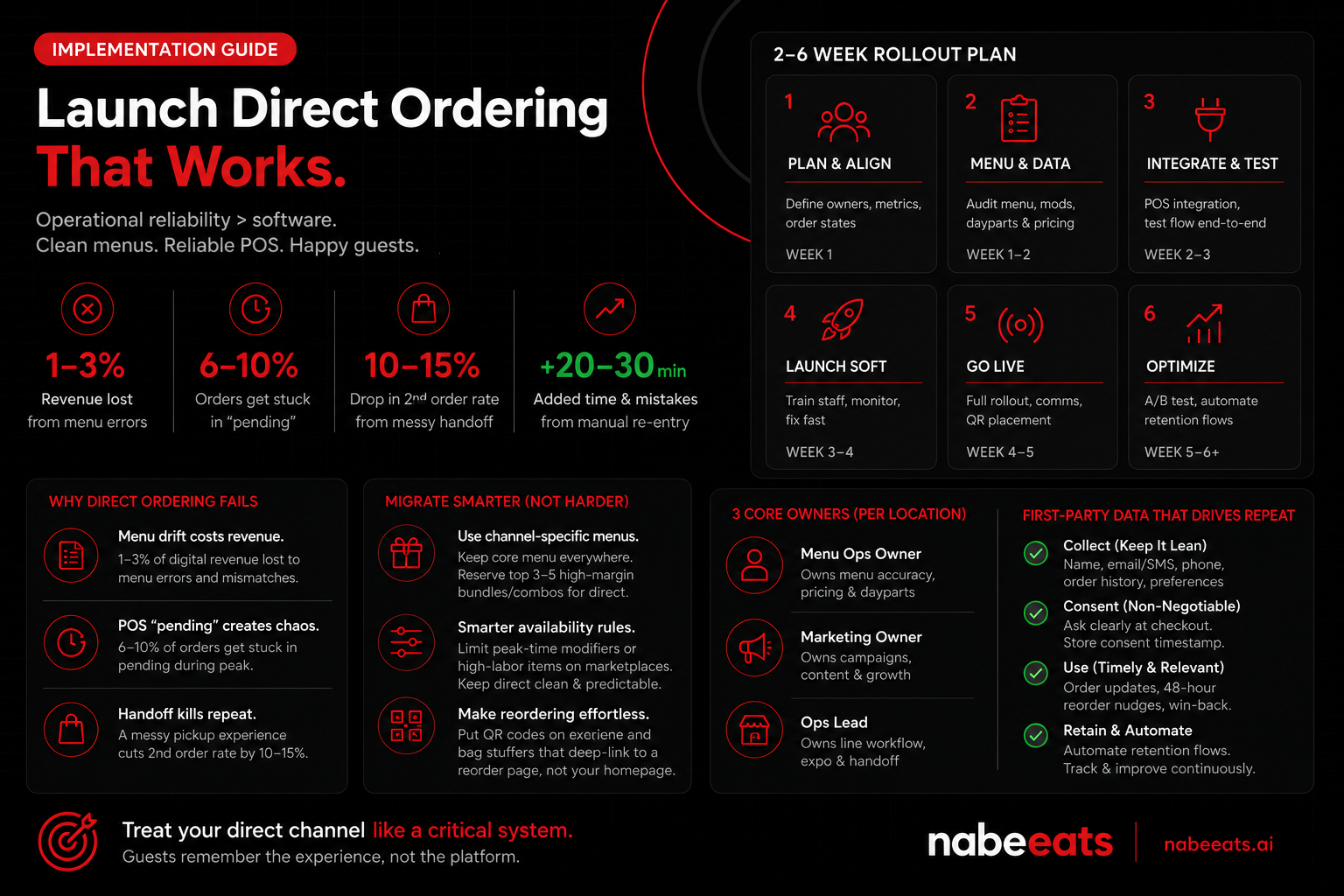
A successful direct ordering launch depends less on picking software and more on operational reliability—clean menu governance, monitored POS order states with acknowledgment SLAs, and a guest-friendly migration plan that uses reorder shortcuts and bundles instead of forcing behavior change.
We’ve seen this play out at nabeeats.ai with a 3-location sushi + poke operator: the “platform” wasn’t the problem; the workflow was. Treat your direct channel like a critical system, not a marketing project (because guests don’t care whose logo is on the checkout page when their order disappears).
Problem: “We launched,” but orders fail, menus drift, and guests don’t come back
Direct ordering fails quietly. You’ll lose 1–3% of digital revenue to menu errors if nobody owns governance. That range comes straight out of what we routinely observe in menu audits—86 mismatches, wrong modifier logic, and daypart rules that don’t match reality (id=cons_1).
The other silent killer lives in the POS layer. A small “pending” order-state failure can create a big accuracy problem. In that sushi + poke group, 6–10% of direct orders fell into “pending” during peak and got manually re-entered, adding 20–30 minutes and spiking mistakes (id=anec_4).
Then there’s the unglamorous part—handoff. A messy pickup experience can cut second-order rate by 10–15%. That’s not a UI issue; it’s the last 30 feet: labeling, shelves, signage, seals, and the “pickup ready” moment (id=cons_2).
Approach: a 2–6 week rollout with owners, SOPs, and failure-mode prevention
Run this like an ops rollout, not a website launch. Assign three owners per location (even if two are the same person): a Menu Ops Owner, a Marketing Owner, and an Ops Lead who owns line behavior and expo.
Here’s the 2–6 week timeline we use when you need speed without breaking trust:
Marketplace-to-direct migration: shift mix without angering guests
Move demand with architecture, not ultimatums. Use channel-specific menus: keep your full core menu everywhere, but reserve your top 3–5 high-margin bundles/combos for direct (id=anec_5). Pair that with smarter availability rules—limit peak-time modifiers or high-labor items on marketplaces while keeping direct clean and predictable (id=insight_2).
Make reordering brain-dead simple. **Put QR codes on receipts and bag stuffers that deep-link to a reorder page, not your homepage
Frequently Asked Questions
What is direct ordering for restaurants?
Direct ordering is any ordering channel you control end-to-end so the guest orders from you, pays you, and you keep the customer data. That includes your website ordering page, QR code ordering that lands on your first-party menu, and “Order Online” from Google Business Profile that routes to your direct checkout (not a marketplace). In our work at nabeeats.ai, the cleanest test is simple: if you can’t see the guest record and remarket with consent, it’s not true direct ordering.
Is direct ordering really commission-free?
Direct ordering isn’t “free,” but it usually avoids the 15%–30% marketplace commission in exchange for a more transparent cost stack. You’ll still pay card processing (often ~2.6%–3.5% + $0.10–$0.30), ordering software fees, and—if you offer delivery—driver or aggregator costs like DoorDash Drive that vary by market and distance. Model your contribution margin per channel in dollars, not vibes, because contracts and fee structures differ a lot by provider.
Do I need an app for direct ordering?
You don’t need an app for direct ordering unless you run a high-frequency concept where guests order weekly (think coffee, pizza, or multi-unit fast casual). Start web-first: a fast mobile ordering site plus Google Business Profile links usually beats an app on ROI early because app downloads create friction (honestly, most guests won’t bother). Build an app only after you’ve proven repeat rate and you can justify the ongoing upkeep—menu updates, OS changes, and push permission management.
How do I get customers to order direct instead of DoorDash or Uber Eats?
You move guests to direct ordering by making “reorder” the default behavior, not by shaming them for using marketplaces. Use channel-exclusive bundles (not blanket discounts) like a “Family Pack + free add-on” that only appears on your direct menu, and train a 10-second cashier script: “If you liked this, scan here to reorder faster next time.” Avoid sudden marketplace shutdowns—we’ve seen that spike negative reviews and cut total demand before direct volume catches up.
What should my SMS and email frequency be for direct ordering?
A good starting point is 2–4 automated messages per month per guest (order confirmations, ready-for-pickup updates, reorder reminders) plus 1–2 broadcast campaigns, as long as you have clean consent for direct ordering lists. Keep SMS tighter than email—carriers and platforms like Twilio and Attentive watch complaint rates, and deliverability drops fast if you over-send (and you’ll feel it). If you can’t name the trigger and the audience segment, don’t send it.
What KPIs should I track for direct ordering success?
The best direct ordering scorecard includes channel mix shift, funnel conversion rate, 30/60/90-day repeat rate by cohort, contribution margin per order, refund/chargeback rate, and order accuracy. Track at least one operational KPI (like “orders late” or “prep time variance”) because ops issues quietly kill retention even when marketing looks good. If your direct conversion rate or refund rate moves by 1–2 points week-over-week, treat it like a fire drill and go find the step that broke using your POS and ordering analytics (Toast, Square, and Google Analytics 4 can all help).
What’s the best way to start direct ordering if I’m overwhelmed?
The best way to start direct ordering is to launch one reliable web ordering flow, connect it to your POS, and then drive reorders from Google Business Profile and in-store touchpoints before you add more channels. Pick three “start here” priorities: clean menu governance, a frictionless checkout, and a basic consented guest list
Win 2026 with direct ordering: your next 14 days
You don’t win 2026 by “having online ordering”—you win by building direct ordering as a profit-and-repeat system that guests trust every single shift.
Start by documenting your baseline (conversion rate, repeat rate, and contribution margin) today, then run the 14-day checklist—if you want a second set of operator eyes, nabeeats.ai can help you tighten the funnel, wire up POS-integrated measurement, and grow repeat orders without discounting.
If you checked again in 90 days, would your direct channel show more orders—or better repeat and margin?
.png)


.png)


