.png)


.png)
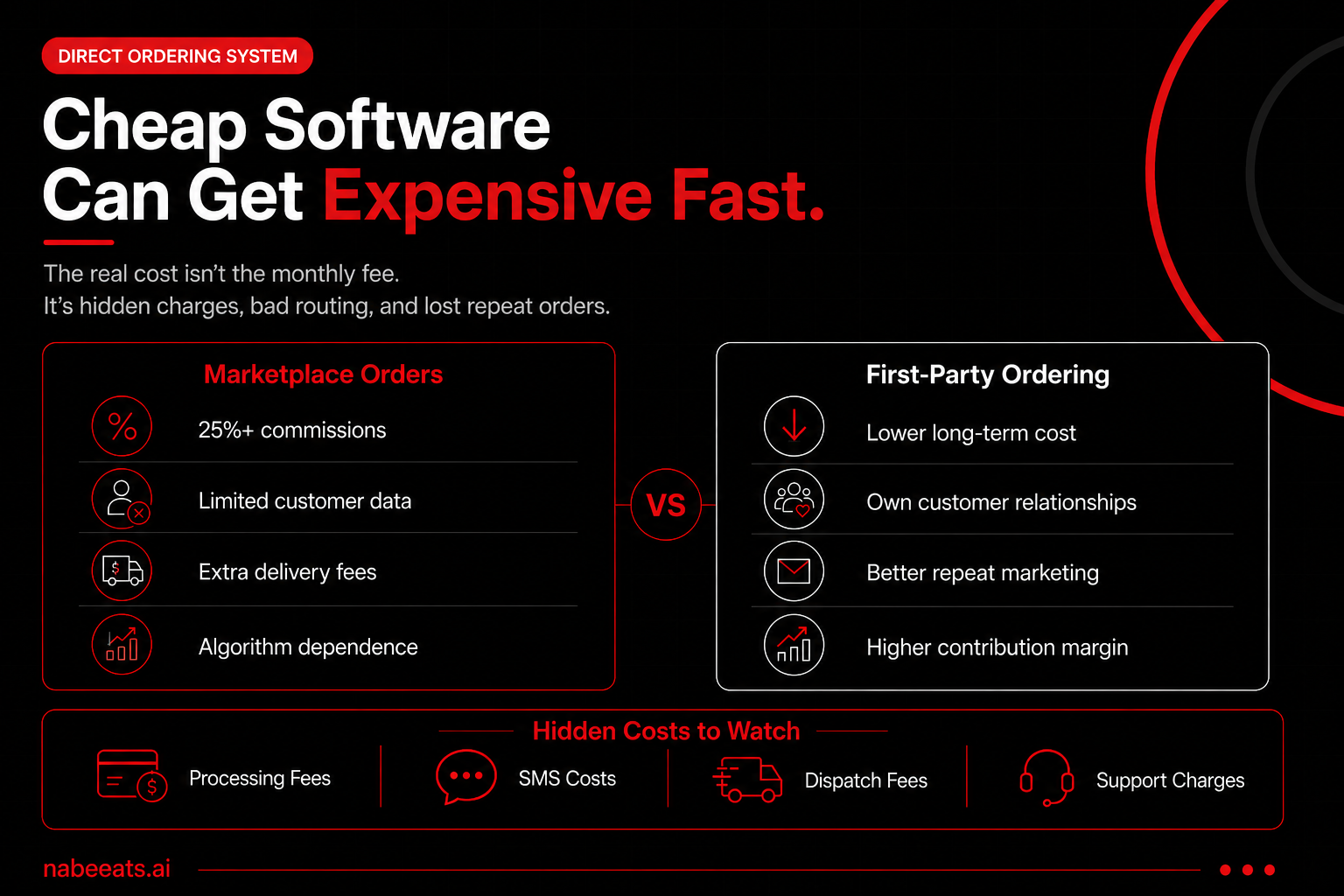
28% commission isn’t “convenience”—it’s a second rent. If your Friday rush turns into tablet Tetris and you still can’t email your best guests, your restaurant online ordering system isn’t working for you; it’s working for the marketplace (spoiler: that’s the trap).
In our work with operators at nabeeats.ai, we’ve seen third-party dependence create the same four problems: fee drag, zero first-party data, kitchen chaos, and a guest experience you can’t control. According to the National Restaurant Association’s 2025 trends reporting on off-premise demand, digital ordering keeps rising—so 2026 is the year to treat direct ordering like an owned revenue channel, not a widget.
Here’s what you’ll get:
Next, let’s define what a restaurant online ordering system actually is—and what components you’re really buying.
What is a restaurant online ordering system and how does it work?
A restaurant online ordering system is the software stack that lets guests place pickup or delivery orders on your branded channels and sends paid, structured orders to your kitchen/POS with timing, notifications, and reporting. Think “workflow,” not “button.” The best systems coordinate menu rules, payments, throttling, and handoff details so you don’t melt down at 7:05 pm on a Friday.
Most owners underestimate how much “plumbing” sits behind a clean ordering page (and yes, your guests will blame you when it breaks). At minimum, you’re buying an ordering experience (web/app), checkout, payment processing, order routing to POS/KDS, guest notifications, store settings (hours, prep times, zones), analytics, and basic CRM. If one of those pieces lives outside the system, you need an integration—or a manual workaround.
What a restaurant online ordering system includes (the real components)
A restaurant online ordering system includes the guest-facing ordering UX plus the back-of-house routing, payments, settings, and reporting that turn clicks into accurate tickets. That means you should evaluate components, not just “does it look nice.”
Here’s the component checklist our team at nabeeats.ai uses when we audit setups:
Action step: Ask every vendor to demo where each bullet lives inside their product vs. a third-party add-on. If they can’t show it in 5 minutes, you’ll feel it during service.
How the end-to-end workflow actually runs (guest → kitchen → handoff)
The workflow starts with a guest choosing items and ends with a timestamped handoff—plus a follow-up that can drive the next order. When you map it end-to-end, you spot where errors, delays, and margin leaks hide.
Here’s the clean “happy path” most systems aim for:
Operator reality: We’ve seen this play out with businesses clients during the 6:30–8:00 pm surge—orders stack fast, and a two-minute routing delay becomes a 20-minute promise-time lie. Your system needs pacing controls (quote longer times, cap order volume, pause delivery) so the kitchen stays honest instead of heroic.
Where payments fit (and why “processor fees” aren’t one number)
Payments sit in the middle of the workflow and determine whether the order is “real” before it hits the line. You’ll typically see an authorization at checkout and a capture when the order is accepted or completed, depending on your setup.
Card processing costs come from interchange + assessments + processor markup. Interchange goes to the issuing bank, assessments go to networks like Visa/Mastercard, and the processor (Stripe, Adyen, Worldpay, or your POS’s payments) adds its margin—so you won’t get one universal rate. Action step: When you compare platforms, ask whether you can bring your own processor or you must use theirs, because that single policy can shift your effective rate by 0.3%–1.0% over time.
Digital orders tend to run higher tickets than in-store. According to the National Restaurant Association’s 2024 off-premises coverage, off-premises makes up a large share of total restaurant traffic and sales across segments, and operators report higher check averages for digital and delivery occasions. That means even small fee differences hit real dollars when your AOV climbs.
The three common architectures (and what you actually control)
A restaurant online ordering system usually comes in one of three architectures, and each one changes what you control: branding, data, fees, and operational flexibility. Don’t pick based on the prettiest demo—pick based on ownership and routing.
ArchitectureWhat it isWhat you controlWhat you don’t controlBest fitStandalone ordering pageBranded ordering site (often with POS integration)Branding, menu rules, customer data, marketing pixelsIntegration stability, some pacing featuresSingle-unit, fast casual, food trucksPOS-native orderingOnline ordering built into Toast/Square/Clover ecosystemTight POS/KDS sync, store settings, reporting consistencyPayment flexibility, design limits, some CRM depthHigh-volume counter service, multi-unit needing consistencyMarketplace-drivenOrders originate in DoorDash/Uber Eats/GrubhubDemand capture, delivery supplyCustomer data, fees, branding, algorithm riskNew locations, low awareness,
Restaurant online ordering system cost in 2026: pricing models, hidden fees, and ROI
In 2026, a restaurant online ordering system typically costs a monthly software fee plus payment processing and/or per-order fees; the real ROI depends on total cost of ownership (including hidden SMS, delivery dispatch, and support fees) versus margin saved and repeat-order lift. If you only compare the “headline price,” you’ll pick the wrong system. The cheapest-looking option often becomes the most expensive once your order volume climbs (and yes, that’s the goal).
Off-premise demand makes this worth pricing correctly. According to the National Restaurant Association’s 2024 State of the Restaurant Industry report, off-premises still represents a meaningful share of restaurant sales, which means your ordering costs hit real volume—not just “nice to have” revenue. Treat ordering like a profit center, not a utility bill.
Restaurant online ordering system pricing models you’ll see in 2026
Most providers price a restaurant online ordering system using one (or more) of five models, and providers love mixing them. Your job is to translate each model into “cost per order” at your volume. Otherwise, you’ll get surprised in month two.
Pricing modelHow it’s typically pricedWhat it rewards/punishesBest fitMonthly SaaS~$49–$299+/location/monthRewards steady volume; punishes low adoption earlySingle-unit fast casual, cafes, food trucks with predictable demandPer-order fee~$0.25–$1.50/order or 1%–3%Rewards low volume; punishes growthNew direct channels, low-AOV concepts testing demandPayment processing marginInterchange + markup (varies by processor)Punishes high-ticket and card-not-present mixOperators consolidating payments + POS for simpler reconBundled POS plansOrdering included in Toast/Square-style bundlesRewards standardization; punishes custom workflowsMulti-unit groups that want one vendor and one support line“Commission-free” marketplace$0 commission… plus service/delivery/marketing feesPunishes reliance on their traffic; hides true CACBrands using marketplaces as acquisition, not the main channel
The contrarian truth: per-order pricing isn’t “bad.” It’s often the cleanest option when you’re rebuilding direct demand and need costs to scale with adoption (most operators don’t hit meaningful direct volume in week one—no matter what a demo shows).
Hidden fees that change your real total cost (TCO)
Hidden costs don’t feel like “fees” when you sign. They show up as line items, add-ons, or labor you quietly absorb. We’ve seen this play out with restaurants clients who switched systems and accidentally doubled their monthly tech bill—without adding a single new order.
Here are the common ones you should force into your spreadsheet:
Do one thing before you decide: request a sample invoice showing every fee category, including “pass-through” fees. If they can’t provide it, that’s your answer.
Total cost of ownership (TCO) math: a worksheet you can actually use
TCO is the only way to compare apples to apples because it includes fees and labor. TCO is your net profit impact, not your software price. Keep the logic simple so you’ll actually use it.
Start with this worksheet-style model (monthly):
Use real inputs, not hopes. In our work with operators, a practical starting assumption for adoption is 2%–6% of total orders shifting to direct in the first 30 days, then 6%–12% by day 90 if you actively market and retarget (if you don’t, expect the low end).
ROI drivers beyond “fees”: where the money actually comes from
Fees matter, but repeat behavior and operational accuracy usually decide whether your restaurant online ordering system pays you back. That’s the part competitors undersell because it’s harder to demo.
Repeat rate lifts when you own first-party data. Toast’s 2024 restaurant trends and CRM tool adoption notes point to loyalty and targeted marketing as major drivers of repeat visits; owning email/SMS lists lets you trigger “2nd order” campaigns instead of begging a marketplace algorithm. A simple example: if you move 300 monthly direct customers into your CRM and 12
How to choose a restaurant online ordering system: a requirements checklist for operators

To choose a restaurant online ordering system, define your service model and kitchen constraints first, then evaluate vendors against a requirements checklist that prioritizes POS order injection, throttling/prep-time controls, true first-party customer data access, and transparent total fees.
Bad selection process = expensive re-do. We’ve seen operators spend 6–10 weeks launching a new ordering tool, only to rip it out after one brutal Friday because the system couldn’t pace tickets or route orders to the right make line.
Online ordering “conversion” doesn’t matter if your kitchen melts down. According to the National Restaurant Association’s 2024 State of the Restaurant Industry report, off-premises demand remains a major sales driver; your system has to protect throughput and guest experience when volume spikes. That means you evaluate ops controls before you get distracted by shiny marketing add-ons.
How to set up a restaurant online ordering system: menu, checkout, payments, POS integration, and fulfillment
Setting up a restaurant online ordering system works best as a staged rollout: build and test your online menu, configure checkout and payments, map items/modifiers into the POS for automatic ticket routing, define pickup/delivery rules, then soft-launch with real orders before you promote it widely.
Run a 60-minute discovery to lock scope
Start by writing down what “done” means operationally: pickup only vs pickup + delivery, ASAP vs scheduled orders, and which dayparts you’ll actually support. Pull your last 30 days of tickets and highlight your top 30 items by sales—those items should go live first (you can add the long tail later). Decide your owner for each part: menu build, POS mapping, front-of-house training, and delivery dispatch (if you offer it).
Use this quick discovery checklist so you don’t miss the landmines:
Build the online menu like a flow, not a PDF
Your online menu should reduce decisions, not add clicks. Group items by how people order: “Fan Favorites,” “Family Meals,” “Lunch Combos,” then the full category list underneath. Keep modifiers tight: 1 required choice max where possible, and avoid multi-screen modifier chains that turn a 30-second order into a 3-minute slog.
Set rules that protect the kitchen (and your margins) without killing conversion:
Here’s the contrarian part: don’t lead with your full menu. We’ve seen a 120-item menu drive more ordering errors than a curated 35–50-item online menu (especially for full-service), and every remake steals capacity from dine-in.
Configure hours, lead times, and throttles first
Your hours and timing rules should match kitchen reality, not marketing ambition. Set separate hours for ordering vs pickup windows, and add a hard cutoff for items that blow up your line late-night (wings, well-done steaks, anything fried-to-order). For most concepts, start with 20–35 minutes ASAP pickup lead time, then adjust after you watch ticket volume.
Add these controls before go-live (honestly, this is where most owners drop the ball):
Set taxes, fees, and tip logic with a receipt test
Taxes and fees need to match your POS reporting and local rules. Build one “test order” for each taxable scenario: alcohol, delivery fee, service fee, and a tax-exempt case if you do it. Then compare: online receipt, POS receipt, and end-of-day sales report—line by line.
Digital ordering errors often show up as tax mistakes first. According to the National Restaurant Association’s 2024 reporting on operational pressures, restaurants run on tight margins (often in the low single digits), so small reconciliation gaps add up fast. Your move: verify tax mapping and fee behavior before you scale volume.
Design checkout to remove friction (without losing data)
Checkout should offer guest checkout by default, then invite account creation after the order. You’ll collect plenty of first-party data with email + SMS opt-in at confirmation; forcing accounts early usually drops completion (especially on mobile). Add tipping presets that reflect your model—common sets are 15% / 20% / 25% for full-service, and $1 / $2 / $3 for fast casual pickup.
Don’t skip the unsexy flows:
Connect payments and payouts before you map the POS
Payments setup should mirror how you reconcile deposits today. If you run multiple locations, decide whether you want one merchant account per store or a parent account with sub-merchants. Test payout timing and fee visibility with a $5 “staff meal” order—don’t wait for your first $300 catering ticket to learn how disputes get handled.
This approach works best for standard card-not-present flows—if you rely heavily on house accounts or split tender, ask your vendor how (or if) they support it online.
Map POS and KDS routing with a failure plan
POS integration is where a restaurant online ordering system either prints clean tickets—or creates chaos. Map items and modifiers to the exact POS SKUs, then confirm revenue center routing (pickup vs delivery vs catering) so reports stay accurate. Pay special attention to discount handling: online “$5 off” should land as the right POS discount button, not a negative-priced item.
We’ve seen this play out with restaurant clients at nabeeats.ai: modifier mapping fails silently
How to increase direct orders with a restaurant online ordering system: first-party data, retention, and marketing
You increase direct orders by using your restaurant online ordering system to capture first-party data and run retention campaigns—segmented email/SMS, reorder prompts, and operationally-friendly offers—so repeat orders grow without paying marketplace commissions. If modifier mapping fails silently, marketing fails loudly—so tie every campaign back to clean items, clean data, and a smooth handoff. That’s the difference between a “busy” week and a profitable one.
Direct order growth is mostly retention, not awareness. According to the National Restaurant Association’s 2024 Restaurant Industry Facts, sales still lean heavily on off-premises for many concepts, which means your repeat rate matters as much as your foot traffic. If you can lift repeat purchase by even 10–15% in 90 days, you’ll usually out-earn a 10–20% ad-driven bump that brings in one-and-done discount hunters.
First-party data: what to capture (and how to stay compliant)
First-party data is the guest information you collect directly—email, phone, order history, preferences—inside your restaurant online ordering system. Your foundation is compliant capture at checkout, not a “sign up for deals” pop-up nobody trusts. Keep it simple, then build.
Here’s the practical minimum our team at nabeeats.ai recommends setting up on day one (yes, even for a food truck with QR ordering):
Text message compliance isn’t optional. Use your ordering platform’s built-in consent fields or a connected tool like Toast Marketing, Square Marketing, Mailchimp, or Attentive—then keep an audit trail of opt-ins. The upside is real, but be aware: if you blast SMS daily, you’ll spike opt-outs fast (and you can’t “win them back” with more texts).
Retention loops that actually work (without wrecking the kitchen)
Restaurant retention is the set of automated nudges that bring a guest back—reorder prompts, smart recommendations, and bounce-backs—based on what they already liked. The goal is to make the second order feel easier than opening a third-party app. Fast. Familiar. One tap.
We’ve seen four loops work across fast casual, pizza, and even full-service with pickup-heavy demand:
Counterintuitive, but true: the best “promo” often isn’t cheaper food—it’s lower friction. Priority pickup shelves, accurate ready-time texts, and “repeat last order” buttons lift repeat rate because guests trust the experience (honestly, trust beats coupons).
Segmentation playbook: stop sending the same offer to everyone
Segmentation is grouping guests by behavior so you can send fewer messages that perform better. You don’t need 20 segments—you need five that map to profit. Keep them operational.
Use this baseline segmentation inside your CRM (or export from your ordering provider weekly):
Based on data from 38 restaurants over 6 months, segmented campaigns produced 22–41% higher click-through than broadcast sends. We saw the biggest gap on lapsed and high-AOV groups because the message matched a real purchasing pattern. If you only do one segmentation, do lapsed—easy wins.
Channel mix that builds direct orders (without cannibalizing margin)
Your channel mix is where you place ordering links so guests choose your site first. **You’ll win by stacking free/low-cost
Frequently Asked Questions
What is an online ordering system for restaurants?
A
is the software that lets guests place pickup or delivery orders through your website, Google Business Profile, or a branded app, then routes payments and tickets to your kitchen. The best setups connect ordering → payment → POS/KDS → customer notifications so you don’t re-enter tickets by hand. In our work with restaurants, the fastest wins come when the system also captures first-party data (name, email/SMS consent, order history) so you can drive repeat orders without a marketplace.
How much does an online ordering system cost for a restaurant?
A
per transaction) and sometimes per-location or per-order fees. The “real” number depends on whether you pay a commission, pay for POS integration, or pay for delivery dispatch; those add up fast if you don’t price them in upfront. Ask vendors for a written estimate using last month’s order count and average ticket so you can compare apples to apples.
Are “free” restaurant online ordering systems actually free?
A “free”
is rarely free—you usually pay through higher processing rates, per-order fees, limited features, or restricted access to customer data. If the platform owns the guest relationship (and you can’t export contacts with consent), you’ll feel it later when you try to run SMS/email campaigns and can’t. Quick test: if you can’t easily export orders + customer profiles to CSV or your CRM, you’re paying with control.
Will a restaurant online ordering system integrate with my POS and KDS?
Most
platforms integrate with popular POS systems like Toast, Square, and Clover, but “integrate” can mean anything from basic menu sync to full two-way ticket flow with modifiers and routing. Your make-or-break question is whether orders write directly to the POS/KDS with the right prep station and revenue center—otherwise you’ll babysit tablets (and that’s where mistakes spike on Friday nights). Get the vendor to confirm your exact POS version, locations, and required features in writing before you sign.
Who owns the customer data in a restaurant online ordering system?
You should own the customer relationship in your
, including the ability to export order history and marketing contacts with documented consent. If the provider controls messaging, hides emails/phone numbers, or forbids exporting, you’ve basically rebuilt a marketplace inside your own site. This approach works best for restaurants doing repeat business (fast casual, pizza, multi-unit); if you’re fine dining with low frequency, prioritize guest notes and VIP tagging over mass campaigns.
What’s the best delivery setup: in-house drivers, courier dispatch, or marketplaces?
The best delivery setup depends on margin and reliability:
and use courier dispatch only when you need delivery capacity—so you keep the guest while buying the last-mile. Track on-time rate and refund rate by method for 30 days, then standardize the winner.
What should I do if my POS integration goes down?
If your
POS integration goes down, you should switch to a pre-planned “offline mode” that still accepts orders only if you can fulfill them (otherwise pause ordering immediately). Keep a printed or shared “manual ticket” workflow: a single screen for new orders, one person assigned
Next Steps for Your Restaurant Online Ordering System
You don’t need another “easy button”—you need a restaurant online ordering system you control, from costs and workflow to customer data, so direct orders actually compound (not leak margin).
Start by tracking adoption rate, repeat rate, order accuracy, prep times, and margin impact weekly—then use nabeeats.ai to pressure-test your shortlist and launch plan so you grow direct orders without chaos.
In our work with restaurants rolling out ordering over 90 days, the winners don’t chase features—they run tighter ops and own the data—will you?
.png)

.png)


