.png)


In 2026, a 3% “software fee” can quietly turn into 12%+ once payment markups, refunds/chargebacks, and re-fire labor pile on. That’s why online ordering systems for restaurants don’t fail on features—they fail on economics and broken “integrations” (spoiler: the menu sync is usually the first thing to crack). According to the National Restaurant Association’s 2026 outlook, off-premise demand keeps climbing, but operators feel the squeeze most in fees and labor.
This guide is for independents and GMs buying your first platform or replacing a duct-taped stack, and it won’t read like a vendor listicle. You’ll get a buyer’s framework to compare true total cost and operational risk—before you sign anything.
You’ll learn: TCO math, POS/menu integration reality (Toast, Square, Clover), guest UX that lifts AOV, marketing/CRM and first-party data, and reliability/ops impact. Next, we’ll define what “good” looks like by calculating total cost beyond the headline price.
Online ordering systems for restaurants: how to calculate total cost (software + payments + delivery + labor)
Total cost for an online ordering platform is the sum of software fees, payment processing, delivery costs, and the labor/time needed to keep menus and orders accurate—so the cheapest sticker price often isn’t the lowest-cost system.
TCO is what you actually pay to run online orders, not what the sales page claims. Total cost of ownership (TCO) is your fixed fees + per-order fees + payment costs + delivery-related costs + the “people cost” to keep everything updated and accurate (and yes, that last one sneaks up fast).
“Free” and “commission-free” can still be expensive because somebody always pays for payments, delivery, and support. We’ve seen operators swap to a “$0/month” tool, then discover they’re paying an extra 40–80 bps in processing and $0.25–$0.50 in “service” fees per ticket—quietly erasing the savings on 2,000+ monthly orders.
Digital ordering keeps growing, but the fee stack grows too. According to the National Restaurant Association’s 2024 State of the Restaurant Industry report, off-premises demand remains elevated versus pre-2020 levels, which pushes more transactions through card-not-present rails (higher risk, higher costs). That’s why you need math, not vibes.
Start with a simple TCO formula you can reuse
Your baseline calculator fits on one line: Monthly TCO = Fixed platform fees + (Monthly orders × per-order fees) + (Online sales × payment rate) + Delivery costs + Labor hours × fully loaded wage + “losses” (refunds, chargebacks, missed orders). Keep it blunt; you can refine it later.
Use a 90-day forecast, not last weekend’s rush. Pull the last 13 weeks of tickets from Toast POS, Square, Clover, or your POS export, then estimate online order count and average order value (AOV) by channel. Seasonality matters—pizza in January and patio season in May won’t match (you already know that pain).
Cost categories most platforms don’t headline
Software fees split into “fixed” and “per order”. Expect $50–$400/month for basic SaaS, then add $0.10–$0.50 per online order on some systems, especially if they bundle guest texting or loyalty. If you run multi-unit, pricing often jumps by location and by feature tier.
Payments usually dwarf software once you scale. Card-not-present processing commonly lands around 2.9% + $0.30 per transaction in the US (varies by processor, risk, and volume), and even a 0.30% swing equals $300/month on $100,000 in online sales. Visa and Mastercard publish interchange programs, but your effective rate depends on your processor’s markup and your mix of rewards cards.
Delivery has three different “cost shapes”, and confusing them wrecks comparisons. Marketplaces may charge commissions (often 15–30%), “merchant-funded promos,” and item markups if you don’t control menu parity; white-label dispatch (DoorDash Drive, Uber Direct) typically charges a per-delivery fee (often $6–$12) without taking a percentage. The wrong shape can crush high-AOV tickets or low-margin items.
Messaging and marketing fees creep in once you want better conversion. SMS can run $0.01–$0.05 per text plus platform fees, and email/CRM features often sit behind higher tiers; tools like Olo, Toast Digital Ordering, and Square Online differ a lot here. If you plan to send order status texts and win-back campaigns, price it up front.
Hardware and support tiers still matter, even if ordering is “online.” Some setups require a dedicated kitchen printer, expo screen, or tablet, plus networking gear; budget $300–$1,200 upfront if you need reliability. Also ask what “support” means—24/7 phone support may live behind a premium plan, which becomes relevant the first Friday your menu won’t sync.
Operational costs: the stuff that quietly eats margin
Labor drag is real—and predictable. In our work with restaurants at nabeeats.ai, operators most often underestimate weekly menu maintenance (modifiers, 86’ing, price changes) and exception handling (refunds, substitutions, driver issues). Two hours a week doesn’t sound like much until you cost it at $22–$30/hour fully loaded and multiply it by 52.
Refunds and chargebacks deserve their own line item. Card-not-present disputes cost time plus fees (often $15–$25 per dispute) and you can still lose the food cost when you win; track your dispute rate monthly. If 0.4% of online orders need refunds at a $45 AOV, that’s $360/month in refunds on 2,000 orders—before labor.
Downtime costs more than the monthly subscription when your system breaks during peak. If your online ordering goes down for 45 minutes on a Friday and you average 25 online orders/hour at $38 AOV, you just “lost” ~$712 in sales, plus the phones light up. Ask vendors for uptime reporting and incident history, not just promises.
Comparison table: three real-world TCO scenarios (QSR vs full-service vs pizza)
These examples show how fee mix beats sticker price. Plug your own order volume and AOV into the same structure to compare online ordering systems for restaurants apples-to-apples. I’m using representative ranges we see most often; your contract will vary by region, risk profile, and processor.
Pizza (delivery-forward, peak-sensitive)2,400 orders; $31 AOV; $74,400 sales$200/mo SaaS; $0.15/order; 2.95%+$0.30 payments; 1,500 marketplace deliveries at 20% commissionFixed: $200 + (2,400×$0.
POS integration for online ordering systems for restaurants: menu sync, throttling, and what “integrated” really means
POS integration is the ability for online orders, menu data, and payments to flow automatically between your ordering channel and POS—reliably, without manual re-entry or constant mismatches. If your team still retypes tickets, babysits tablets, or fixes modifiers mid-shift, you don’t have integration. That gap shows up fast: wrong prices, missed allergy notes, duplicate tickets, and a line cook who’s suddenly doing IT.
“Integrated” means different things depending on the architecture. When you compare online ordering systems for restaurants, you’re really comparing how data moves between systems like Toast, Square, Clover, Revel, or Lightspeed—and what breaks when the Friday rush hits (because something always gets tested then).
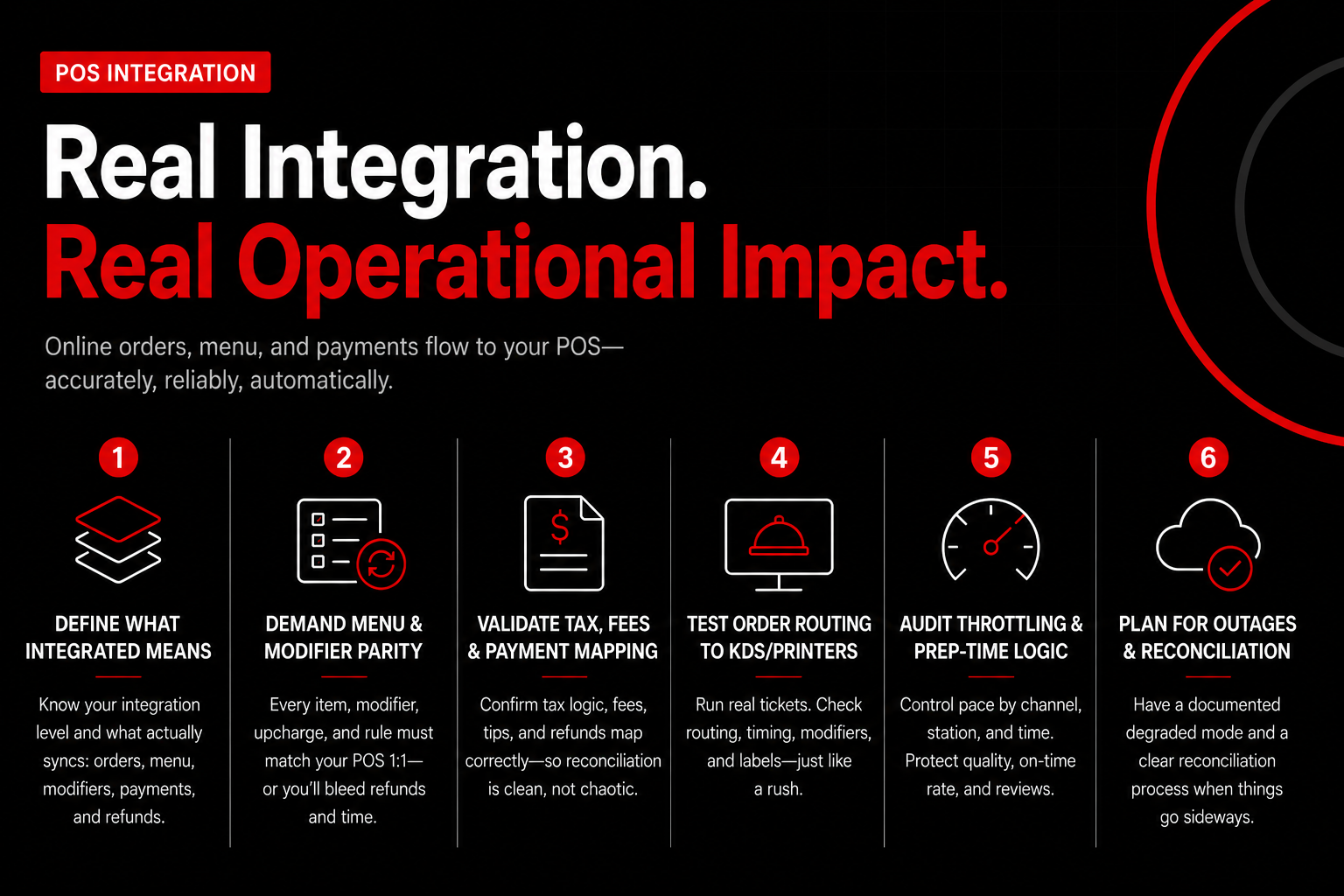
Step 1: Map what “integrated” means in your stack
Start by naming the integration level you’re being sold, then write down what it actually automates. Most demos hide the messy part: modifiers, taxes, and failure modes. Ask the vendor to state—plainly—whether orders, menu items, modifiers, payments, and refunds sync automatically, and in which direction.
Use this simple taxonomy in your notes (and don’t accept hand-wavy answers):
Direct API usually wins for independents when your menu changes weekly. The upside is fewer touchpoints; the caveat is you’ll depend on the POS partner ecosystem (if you’re on an older POS build, your “integration” may quietly downgrade).
Step 2: Demand menu-and-modifier parity (not just “orders flow”)
Define “menu sync” as more than item names. You need modifier parity: every option, upcharge, and rule must match the POS 1:1. If your POS says “Pizza / Large / Gluten-free crust +$3 / Half-and-half toppings,” your online menu has to represent that exactly—or you’ll bleed refunds.
We’ve seen this play out with a fast-casual pizza shop that ran Toast in-store and added a third-party ordering channel with “semi-sync.” A single modifier set (“extra cheese” +$2) failed to update for 19 days, and the operator ate 147 refunds plus two hours a week of manager time reconciling complaints and adjusting checks (honestly, the time hurt more than the refunds).
When you evaluate online ordering systems for restaurants, make the vendor prove they support these menu realities:
If the vendor can’t show modifier rules in a live POS sandbox, assume they can’t support them at scale. Screenshots don’t count.
Step 3: Validate tax, fee, and payment mapping before you sign
Confirm how taxes, service fees, packaging fees, and tips map from checkout to the POS close-out. Bad mapping creates daily reconciliation noise and month-end accounting chaos. Your bookkeeper will catch it—after you’ve already run hundreds of orders.
Ask specifically whether the integration supports item-level taxability (e.g., cold food vs hot food), delivery zone taxes, and fee line-item mapping. Get answers on refunds and partial refunds, too. If the ordering system can’t push a refund reason and amount back into the POS, you’ll end up doing “shadow accounting” in spreadsheets.
Use a real report to sanity-check the vendor’s claims. According to the National Restaurant Association’s 2024 State of the Restaurant Industry report, operators continue ranking labor and food costs as top pressures; integration mistakes add labor minutes you don’t have. Translation: a 2-minute manual fix on 60 orders/day becomes 20 labor hours/month—roughly $320–$500/month at $16–$25/hour, before payroll burden.
Step 4: Test order routing to KDS/printers like you’re working a rush
Make the vendor show exactly where an online ticket prints and how it routes. “It hits the POS” isn’t enough if the expo station never sees it. In a full-service dining room, you may want online orders to route to a dedicated KDS screen; in a food truck, you may need a single printer with big modifiers and promised pickup time.
Here’s a practical routing drill you can run in under 30 minutes:
If your kitchen can’t read the ticket in two seconds, you’ll pay for it in remakes. That’s not a software problem—it’s an operational one you can prevent in evaluation.
Step 5: Audit throttling, prep-time logic, and promise times (the stuff competitors gloss over)
Throttling is the system’s ability to cap order volume so your kitchen doesn’t get buried. The best online ordering systems for restaurants let you control pace with rules—by channel, by station, and by time block. Without it, a 20-ticket spike at 6:05 PM will torch your on-time rate and your reviews.
Demand specifics on:
Counterintuitive insight: tighter throttles often raise revenue. You’ll convert fewer “impulse” orders, but you’ll protect food quality and earn repeat behavior—especially in sushi, BBQ, and peak-lunch corporate zones where one bad experience kills the account.
Step 6: Plan for outages and reconciliation (because the POS will go down)
Ask what happens when the POS loses internet, the ordering system has an outage, or the integration token expires. You need a documented “degraded mode” that your shift leads can run. If the vendor can’t describe it in one minute, they haven’t lived it.
(yes,
Guest experience and checkout design that increase online order conversion and average order value
The best online ordering systems for restaurants increase revenue by reducing checkout friction and systematically driving add-ons and bundles—without adding labor. Once your integration won’t break on a Friday night, UX becomes your highest-leverage profit lever. Baymard Institute’s checkout research consistently shows that avoidable friction (extra steps, surprise fees, forced account creation) drives abandonment, and restaurants feel that same drop-off at the cart. Fix the flow, and you’ll see it in sales within days (not weeks).
Evaluate UX like you’d evaluate a new menu item: with a scoreboard. In our work with restaurants at nabeeats.ai, we track five numbers weekly so operators can compare platforms on “revenue quality,” not feature lists. Don’t accept “our UX converts well” from a demo—ask the vendor where these metrics live in reporting, and whether they can segment pickup vs delivery.
What is the cheapest online ordering system for restaurants?
The cheapest online ordering system for restaurants is the one with the lowest total cost at your order volume, not the lowest monthly software fee. Processing and “per-order” charges usually dwarf the subscription: a 2.9% + $0.30 card rate on a $28 ticket costs about $1.11, and that adds up fast at 2,000 orders/month. Action step: price three volume scenarios (500/2,000/6,000 monthly orders) and include software, payment processing, SMS fees, and any “order fee” so you don’t pick a “cheap” tool that becomes expensive as you grow.
What is a commission-free online ordering system?
A commission-free online ordering system is a platform that doesn’t take a percentage of each order like a marketplace, but you still pay software and payment processing. “Commission-free” doesn’t mean “fee-free”: you’ll typically see a monthly platform fee plus card processing (via Stripe, Square, Toast Payments, etc.), and sometimes add-ons for delivery dispatch or marketing. Use the language carefully with your team—operators get burned when they budget for “0% commissions” and forget that processing alone often runs 2.6%–3.5% depending on card mix and negotiated rates.
One contrarian takeaway: the “prettiest” ordering site can underperform a boring one. We’ve watched a fine-dining concept swap to a minimalist checkout with fewer photos, faster load time, and Apple Pay; conversion rose 8% in 30 days, even though the design looked less “premium.” The win came from speed and clarity, not aesthetics—so test with numbers, not opinions.
Want help implementing this? See how Nabe Eats can streamline your restaurant marketing.
Next, you’ll want to keep the guests you just converted. Once conversion rate and AOV look healthy, the real compounding starts when your online ordering system feeds first-party data into CRM, loyalty, and marketing automation based on ordering behavior—so your Tuesday is stronger, not just your Saturday.
Marketing, loyalty, and first-party data: choosing online ordering software that actually grows repeat business
First-party marketing for restaurant online ordering works when your platform captures usable customer data and automates targeted repeat-business campaigns—without constant discounts that erode margin. That’s the real “growth feature” in online ordering systems for restaurants: ownership, segmentation, and measurement that survives vendor changes.
First-party data is the guest information you collect directly (name, phone/email, order history, LTV, item preferences, location, and consent). If your online ordering software only gives you an end-of-month PDF and a generic “customers” list, you don’t own a relationship—you’re renting it.
Ask what data you get, how fast you can export it, and whether it’s portable when you switch vendors. The painful scenario we see: you migrate restaurant online ordering to a new tool and lose 18 months of order history because the old provider only exports emails, not item-level behavior or timestamps (and yes, it happens to multi-unit groups too).
First-party data ownership: the “data portability test” you should run before you sign
Data ownership isn’t a slogan—it’s a contract and an export format. Your checklist should cover: raw order history, guest profiles, marketing consent fields, loyalty balances, and campaign attribution tags, all accessible without paying a “data services” fee.
Insist on at least two export paths: CSV downloads and an API. CSV gets you moving fast; an API keeps you from rebuilding reports every week when you scale from 1 to 4 locations.
Plan for the switch on day one. If your vendor won’t contractually commit to delivering a complete export within 10 business days of termination, treat that as a real operational risk—because it is.
CRM features that matter (and the ones that just demo well)
Good CRM in online ordering systems for restaurants starts with usable customer profiles and simple segmentation. You want to target “new,” “active,” and “lapsed” guests based on behavior, not vibes.
Set your minimum segmentation rules in writing. Our team at nabeeats.ai typically recommends three default segments you can deploy in a week: new guests (first order within 30 days), repeat guests (2+ orders within 60 days), and lapsed guests (no order in 45–60 days depending on category).
Automations beat one-off blasts. Look for win-back flows (lapsed), bounce-back prompts (24 hours after pickup/delivery), and smart reorder nudges (“You usually order on Fridays—want the same again?”) tied to order history.
Don’t let “email marketing” be the whole pitch. If the platform can’t sync segments into tools like Mailchimp or Klaviyo-style systems—or into POS-native CRM like Toast Loyalty—your team will end up copying lists and guessing what worked.
73% of diners read online reviews before choosing a local restaurant. That pattern shows up consistently in BrightLocal’s Local Consumer Review Survey (2024), and it’s why your post-purchase prompts should push feedback to you first, then route happy guests to Google/Yelp.
Loyalty design: points vs visits vs spend-based (and how to avoid margin leaks)
The best loyalty program matches how guests naturally buy from you. A coffee shop should usually run visits-based (“buy 8, get 1”), while a fine dining spot does better with spend-based milestones tied to higher check averages.
Loyalty modelBest fitHow it should work in checkout/receiptCommon pitfall (what costs you)Visits-basedQSR, coffee, food trucks with consistent ticket sizesAuto-attach by phone/email; show “1 visit earned” on receipt and order status pageGuests split tickets to farm visits; fix with minimum spend threshold (e.g., $8+)Points-basedFast casual and delivery-heavy brands with frequent modifiersShow points balance at cart and post-checkout; allow redemption in small chunksOver-redemption on high-food-cost items; restrict to categories or set max % offSpend-based tiersFull service, bar-forward concepts, multi-unit groupsTier progress bar (“$42 to Gold”); benefits trigger automatically at checkoutBenefits stack with promos and comps; block stacking by rule and manager overrideItem-based perksPizza, wings, dessert-driven brandsAuto-suggest eligible reward item in cart; print “Reward unlocked” on receiptReward item has high food cost; tie to slow-moving items or low-cost add-ons
Integrate loyalty into the ordering moment, not a separate app nobody opens. If guests can’t see points/tier progress in checkout (or at least on the digital receipt), your redemption rate will crater—and then you’ll blame “lack of demand” instead of UX.
Watch for discount leakage. Require the platform to support rules like “one reward per order,” “no stacking with BOGO,” and “reward excludes alcohol,” because blanket discounts quietly eat contribution margin.
We’ve seen this play out with a fast-casual client: repeat orders rose 14%, but margins dropped 2.3 points until they segmented offers. They stopped sending $5-off blasts to everyone and switched to a lapsed-only ladder: 10% off after 45 days, then a free add-on after 60 days if no return—profit recovered within 6 weeks.
Attribution and reporting: prove ROI by channel (not by “opens”)
Attribution is the system’s ability to tie a campaign to an order and margin outcome. If your vendor can’t show revenue, redemptions, and incremental lift by channel, you’ll end up optimizing for email volume instead of profit.
Demand campaign tracking that survives the real world. You want UTM support for Google/Facebook, unique promo codes, and “source” fields on orders so you can answer simple questions like: did SMS win back lapsed guests at a lower discount than email?
Insist on export/API access to reporting tables. If you can’t pull orders, guests, and promo redemptions into a spreadsheet or BI tool, you can’t audit the math (and you’ll miss fraud patterns like internal code sharing).
. NRA data continues to show labor and food costs remain the two biggest pressure points for operators (National Restaurant Association, 2024)
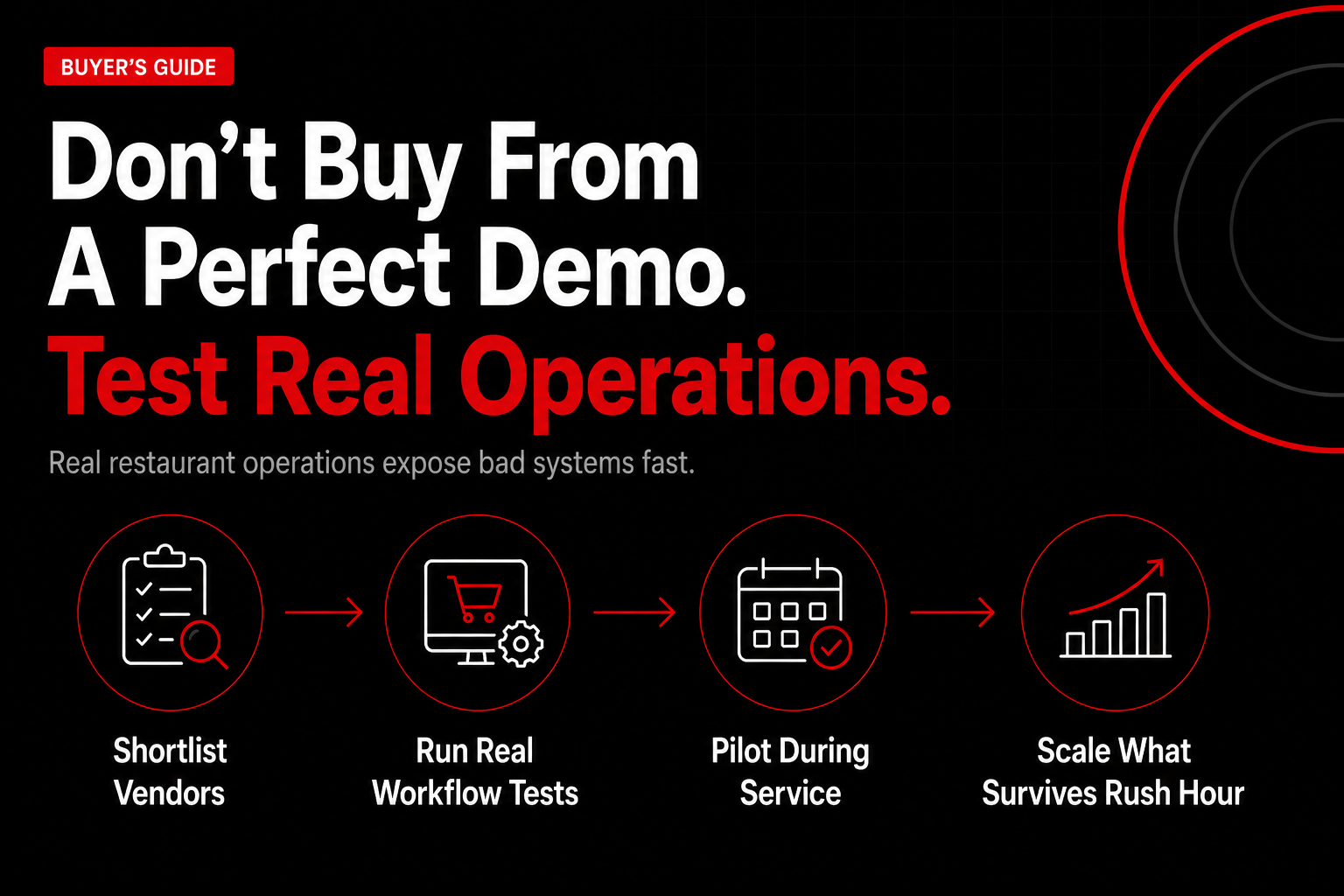
How to choose an online ordering system for a restaurant in 2026: vendor shortlist, demo script, and pilot plan
To choose an online ordering system in 2026, you should shortlist options by total cost and POS fit, run a scripted demo using your real menu edge cases, then validate performance in a short pilot with clear pass/fail metrics before signing a long contract.
Your exports and APIs tell you what happened, but this process decides what will happen next—on a Tuesday rush, when the printer jams and a guest wants a refund, not when a rep clicks through a clean sandbox.
Define your “must-not-break” requirements
Start by writing a one-page requirements sheet that your team can actually use. Pick 8–12 non-negotiables tied to operations: order injection to POS, kitchen routing, tax rules, tip handling, refunds, and staff workload.
Force decisions with a simple rubric: Must-have, Nice-to-have, Dealbreaker. Include your weird stuff (and yes, every restaurant has weird stuff): half-and-half pizzas, “no ice” mods, scheduled catering, alcohol ID checks, and split payments.
Before you talk to vendors, decide which decision path you’re on: POS-led ordering, middleware, first-party ordering, or low-cost/free. In practice, that means comparing options like Square online ordering (POS-led), Deliverect integration (middleware), ChowNow online ordering (first-party), and GloriaFood online ordering (low-cost/free) against the same operational requirements.
Map your current stack and failure points
Inventory every system that touches an order: POS, payments, loyalty, email/SMS, accounting, delivery, and reporting. If you can’t draw your order flow end-to-end, you can’t control it.
In our work with restaurants, the biggest surprises hide in settlements. Pull three months of processor statements and settlement reports (Toast, Square, Stripe, Adyen, whoever you use) and match them to POS sales—line by line for one week, not just totals.
Write down your “breakage list” with real examples: menu sync delays, modifier mismatches, missing prep notes, duplicate tickets, or refunds that never hit the batch. You’ll use this list as your demo script and pilot test plan—it’s your leverage.
Shortlist vendors by POS compatibility and true TCO
Cut your list to 3–5 vendors by filtering on POS compatibility and total cost of ownership (TCO). Don’t shortlist on feature count; shortlist on what reduces labor and fee leakage.
Use this quick comparison framework to keep the shortlist honest. Compare vendor types, not just brand names:
POS-led ordering (e.g., Square online ordering): ideal fit is single- or few-location operators already standardized on that POS; typical fee model is software + payment processing (sometimes bundled); integration depth is usually deepest for tickets, payments, and reporting; tradeoff is you may accept that POS ecosystem’s limits on customization or multi-channel flexibility.
Aggregator/multi-channel middleware (e.g., Deliverect integration): ideal fit is restaurants juggling multiple marketplaces and needing menu/order normalization; typical fee model is subscription per location (sometimes per channel); integration depth is strong for routing and menu sync across channels; tradeoff is you’re adding a layer—when something breaks, you must know whether it’s the marketplace, middleware, or POS.
Independent-restaurant first-party ordering (e.g., ChowNow online ordering): ideal fit is operators prioritizing direct orders, brand control, and guest data; typical fee model is subscription (sometimes with add-ons); integration depth varies by POS and can be “good enough” or excellent depending on your stack; tradeoff is you may still need separate tooling for third-party delivery marketplaces.
Low-cost/free ordering (e.g., GloriaFood online ordering): ideal fit is small menus, low complexity, and teams willing to trade time for savings; typical fee model is free/low subscription with paid add-ons; integration depth is often lighter (more manual steps); tradeoff is hidden labor cost and higher risk of reconciliation or ticketing workarounds.
Here’s the counterintuitive part: the “cheapest” online ordering for restaurants often costs you more if it forces manual reconciliation, comping, and ticket re-entry. We’ve seen a $150/month tool add 6–10 manager hours/week once you include menu edits, refunds, and end-of-night fixes (that’s roughly $900–$1,500/month at $25/hour).
Do a 30-minute “TCO gut check”: ask each vendor for an all-in quote based on your last 30 days of online order count, AOV, and card mix, then compare it to your processor statement math.
Run a scripted demo that forces real workflows
Make the vendor run your demo script live, using your actual menu and your actual POS (not a generic burger shop). If they won’t, you’re not buying software—you’re buying a promise.
Require a start-to-finish flow: customer checkout → POS ticket → kitchen routing → status updates → refund. Time it—a clean online ordering system should let a guest reorder in under 60 seconds for saved favorites (Apple Pay/Google Pay helps a lot).
Ask one uncomfortable question: “Show me where failures live.” If an order fails to inject, where does it queue, who gets notified, and what’s the recovery time—2 minutes or 20?
Questions to ask each vendor type: POS-led—“What happens if we change processors or add a second POS brand?” Middleware—“In a failed order, which system owns support and what are the logs we can access?” First-party—“Who owns guest data, and can we export customers, orders, and UTM attribution?” Low-cost/free—“Which features require paid add-ons, and what manual steps remain during service?”
Do reference checks like an operator, not a buyer
Reference checks work when you talk to restaurants that look like yours. Get 2 references in your POS ecosystem and 1 outside it so you can separate integration issues from operator setup issues.
Use a tight question set. Ask about the ugly days (Friday at 7:00 p.m., a sports night, a holiday pre-order surge), not just “Do you like it?”
Verify with receipts: ask references for a redacted screenshot of a settlement report and the platform’s order report for the same day. One mismatch is a fluke; three is a system.
Run a 2–4 week pilot with pass/fail thresholds
A pilot is a controlled launch that limits blast radius while you measure performance. Run 2–4 weeks with limited hours or a single channel (e.g., web-only for off-peak, then expand).
We’ve seen pilots fail when teams “open the floodgates” on day one—then blame the software for training gaps. Start narrow: 4:00–8:00 p.m. weekdays, pickup only, no coupons except one test code you control.
Write pass/fail rules before you start: “If POS injection fails more than 0.5% of orders” or “If support takes longer than 30 minutes to respond during service,” the vendor fixes it or you stop.
Negotiate the contract and lock down risk
Your contract controls your downside when things go sideways. Negotiate like you’re buying uptime and accountability, not just an online ordering system.
Pin down the full pricing schedule in writing: software, per-order fees, payment processing (including interchange passthrough vs blended), chargeback fees, and any required add-ons. National Restaurant Association reporting through 2024–2025 continues to highlight rising labor and food costs as top operator pressures—so tiny fee deltas matter when volume climbs.
.png)

.png)


