.png)


.png)
What Is Restaurant Automated Marketing in 2026 (and What It Isn’t)
In 2026, restaurant marketing automation isn’t “more marketing.” It’s a system that automatically sends the right message when a guest does (or doesn’t do) something—based on real purchasing and ordering behavior. If you’re evaluating a platform or restaurant marketing automation software, this guide is about building the lifecycle engine, not just scheduling promos.
The simplest definition: restaurant marketing automation is event-triggered messaging and offers driven by POS, online ordering, and loyalty signals, delivered through email, SMS, and push notifications. Instead of guessing when to send a promo, the guest’s actions create the timing. In practice, that means POS marketing automation turns transactions into triggers you can trust.
This is built for operators, not just marketers. Automated restaurant marketing works for QSR, fast casual, full service, and multi-unit groups because it scales the same lifecycle logic across locations while still respecting local menus, dayparts, and staffing realities.
Who this is for: operators, marketers, and owners who want a repeatable system tied to POS data—especially if you’re shopping for software with POS integration, SMS/email automation, and loyalty/CRM features. What you’ll build: a small set of always-on automations (welcome, second-visit, lapse prevention, winback) that run year-round and improve with tuning.
In 2026, discovery is changing too. Guests increasingly find “what to eat” through AI assistants and conversational search, including chatgpt restaurant discovery-style queries like “best late-night ramen near me” or “kid-friendly patio with gluten-free options.” What influences AI discovery is mostly the same data that powers local SEO, but it’s less forgiving: accurate hours (including holiday exceptions), clean menu structure (categories, modifiers, prices), location pages with consistent NAP, recent reviews and owner responses, schema markup (Restaurant, Menu, OpeningHours), direct ordering links, and up-to-date reservation/catering URLs. Automation helps by keeping listings and menus consistent everywhere—syncing hours and item availability from your POS/online ordering, pushing updates to location pages, and flagging mismatches before guests (or assistants) see them.
When it’s done right, the outcomes are operationally meaningful. The goal is more repeat visits, higher frequency, and higher AOV by nudging the next best action—second visit, lunch add-on, catering inquiry, or loyalty enrollment—without living in a calendar of “Tuesday blasts.”
In this playbook you’ll learn:
Mini-scenario: A guest orders a $28 dinner online on Friday night. Your system recognizes they’re a first-time guest and sends a “Thanks for trying us—here’s a lunch recommendation” message on Sunday at 11:00 a.m. If they return within 14 days, they enter a repeat track. If they don’t, they enter a nudge track. This is automation that follows the guest.
To keep you out of tool-driven confusion, be clear about what this is not.
Restaurant automated marketing isn’t:
The mental model: build a small set of lifecycle automations that run all year, then layer seasonal campaigns when you choose. Automations drive repeat visits while you focus on operations and launches.
Here are the core building blocks you need in place for restaurant automated marketing to work the way operators expect.
Practical tip: Audit what you already do manually. “Follow up with people who ordered once and disappeared” is an automation. “Remind VIPs about our tasting night” is a segment-based campaign or an automation tied to VIP status.
To anchor the rest of this playbook, think in lifecycle stages. Automations should map to where the guest is in the relationship—not your promo calendar.
Mini-scenario across the lifecycle: A new guest orders lunch Tuesday. They get a thank-you and a “try our Friday special” recommendation. If they return within 10 days, they get a loyalty nudge. After 6 visits, they’re tagged VIP and receive early access to a seasonal item and an invite. If they stop coming for 30 days, they get a “we saved your favorite” message featuring what they last ordered. If they go 60 days, they receive a winback with a limited-time incentive and a clear expiration date.
Notice what’s doing the work: the POS and online ordering data. Not vibes. Not generic demographics.
There are benefits, but there are tradeoffs too. Automated restaurant marketing is powerful precisely because it’s measurable, which means gaps in data and permissions show up fast—especially when you add SMS and multi-location complexity.
Benefits of restaurant automated marketing:
Tradeoffs (what you must manage):
Practical tip you can use today: Pick one lifecycle stage and define one trigger in plain language: “If a guest makes a first purchase and doesn’t return within 14 days, send a reminder with their last ordered category.” If you can say it clearly, you can build it cleanly.
One more boundary: automation is not the same as personalization. Automation is “when to send.” Personalization is “what to send.” You can automate without heavy personalization at first, but the best programs combine both once your data is ready.
With the definition set, the next step is making sure your triggers are possible by connecting your POS, online ordering, and CRM/loyalty so identity resolution works, events fire reliably, and personalization pulls from purchase history instead of guesswork.
The Restaurant Automated Marketing Stack: POS + Online Ordering + CRM/Loyalty (Architecture & Data Map)
Restaurant automated marketing only feels “set it and improve it” when triggers are inevitable. Start with this: your POS is the source of truth for money, but rarely for identity. Your architecture must connect transactions to real guests, then convert those transactions into events your CRM can act on.
Think of the stack as six layers. You may already have some; the goal is to spot gaps and tighten integration.
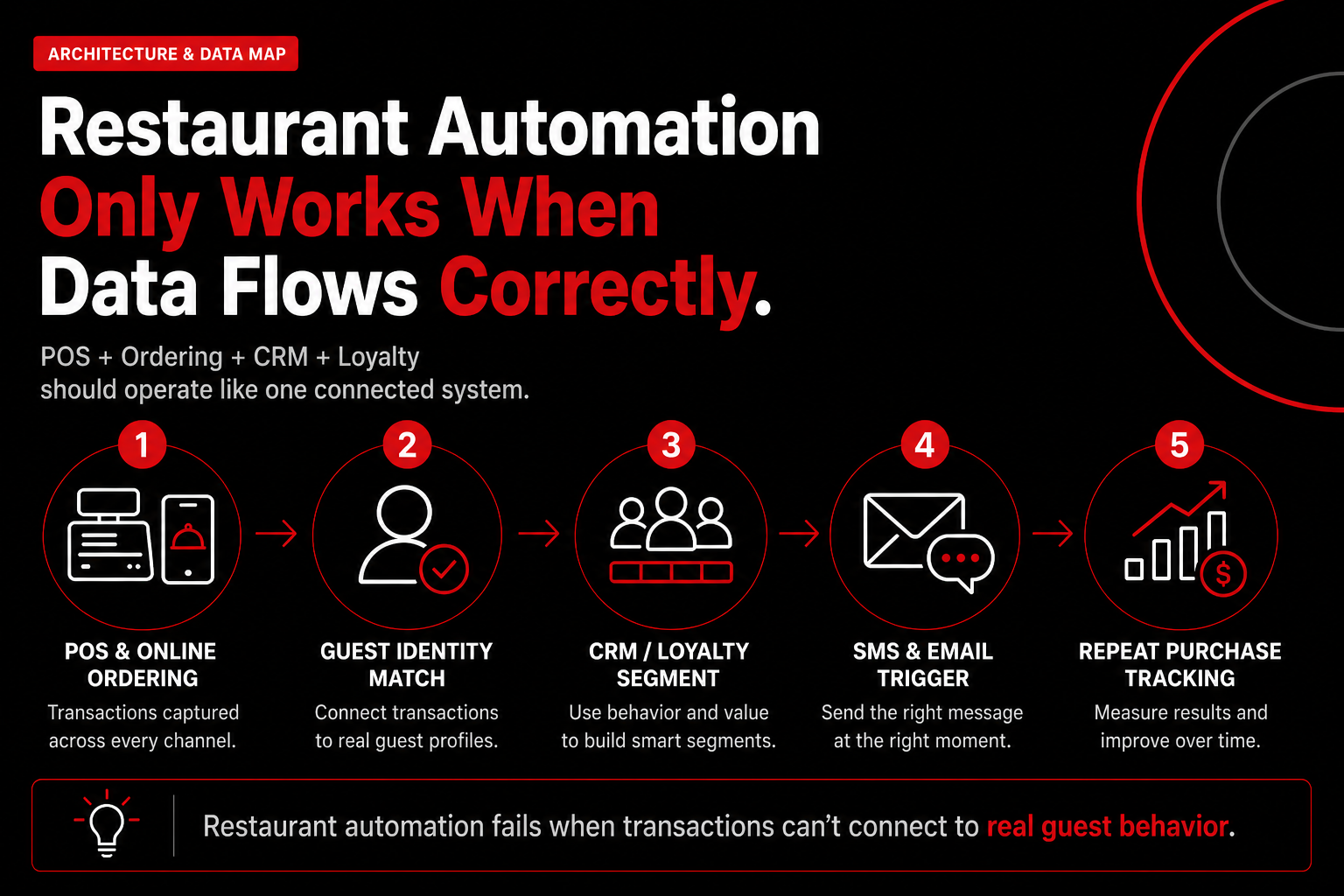
A simple “diagram in words” looks like this:
POS/Online Ordering → purchase event → CRM segment update → send SMS/email → track redemption → update profile → measure repeat rate
When this loop works, restaurant automated marketing stops being “blasts” and becomes a system tied to visits and spend.
1) Your data map: the fields you need (and why they matter)
Automations fail because you don’t have the data, or you can’t match it to a person. Before evaluating vendors, define a minimum viable data map that supports profitable campaigns.
Guest identifiers (at least one must be consistent):
Transaction/order fields (your “behavior truth”):
Consent and compliance fields (non-negotiable):
Loyalty status fields (to drive incentives and suppressions):
Practical tip: if you can only fix one thing this month, fix item-level data + consent + a stable identifier. With those three, you can run most high-ROI automations without guesswork.
2) Identity resolution basics: how you tie in-store checks to a real guest
Most POS transactions are anonymous until you attach them to a guest. Identity resolution is how restaurant automated marketing becomes POS-driven instead of calendar-driven.
Common methods (use more than one to raise match rate):
Set a realistic goal: match 30–50% of in-store transactions to a guest identity within 60–90 days if you’re starting from zero. The point isn’t perfection; it’s enough coverage to move repeat visits.
Example: a guest orders in-store twice a month but never orders online. If you only market to online identities, you miss them. Add phone capture at the POS (“What’s a good number for points?”), and those checks can trigger a VIP invite, lapse winback, or birthday reward based on what they buy.
3) Event taxonomy: the triggers your automation hub must understand
Your CRM can’t automate what it can’t see. Build an event taxonomy—plain-language events mapped to rules—so triggers fire consistently and you don’t rebuild logic for every campaign.
At minimum, build these events for restaurant automated marketing:
Another “diagram in words” you can steal:
POS paid check → event: “Second purchase” → CRM: segment “New regulars” → send: SMS with a next-visit prompt → track: redemption + next purchase
Keep taxonomy tight. If you create 40 events, no one maintains them. If you create 8–12 tied to profit levers, your team uses them.
4) Integration checklist: what to verify before you buy (and before you launch)
Vendor demos look similar. The difference is whether data arrives on time, matches the right person, and stays clean. Use this checklist before you sign—and before you go live.
Internal linking opportunity: if you already track these metrics, connect this stack discussion to your reporting section (repeat rate, frequency, and offer profitability). Also link to your POS/online ordering comparison guide if you have one—operators often need a quick “does this integrate?” reference.
Once you can draw your data flow—POS + online ordering → identity match → event taxonomy → CRM/Loyalty segments → email/SMS → analytics—you’ve done the hardest part. Next, turn plumbing into execution: the automations to deploy first, and the rules that keep them profitable.
POS-Driven Campaigns You Can Launch in 30 Days: Welcome, Winback, Birthday, Lapsed Guest, VIP
Once your data flow is mapped, turn it into restaurant automated marketing that drives the next visit. In 30 days, launch five POS-driven automations that run reliably and scale across locations.
Use this checklist to align restaurant email marketing automation and restaurant SMS marketing automation with triggers, timing, segmentation, offers, and metrics. Treat these as automated email campaigns restaurants can measure from send → redemption → repeat visit.
Required assets: SMS copy, 1–2 email templates per flow, a landing page or preference center, POS offer codes/PLUs with expiry rules, and reporting tags/UTMs.
QA matrix: suppression, frequency caps, opt-in proof, deliverability checks, and redemption validation.
Automated email campaigns restaurants should run first (mapped to POS events):
AutomationTriggerAudience rulesChannel mixOffer guidanceSuccess metricWelcome1st purchase (POS/online)New guest; identity matched; exclude staff/test ordersEmail + SMS (or push)Light incentive or “what to try next”2nd visit within 14–30 daysWinback45 days inactive2+ prior visits; exclude recent refunds/chargebacksEmail → SMSValue-add (bundle/add-on) vs deep discountReturn rate + margin per returning guestBirthdayBirthday week/monthOpt-in; last visit < 180 days; one redemption per yearSMS + emailFree add-on with purchase; short expiryRedemption + incremental spendLapsed guest90 days inactiveHigh AOV or favorites known; suppress if already reactivatedEmail + pushPersonalized “come back” item or reminderReactivation within 30 daysVIPTop 10–20% by spend/visitsHigh LTV; exclude deal-only buyers; confirm opt-inEmail + SMSAccess/perks (early drops, priority seating) over discountsRetention + frequency lift
Email automation blueprint (timing + subject lines): Welcome: 1 hour after purchase (“Thanks for coming in—here’s what to try next”), day 3 (“Your next order, made easy”), day 10 if no return (“Ready for visit #2?”). Winback: day 45 email (“We saved your favorites”), day 48 SMS if unopened, day 55 final email (“Last chance this week”). Birthday: 7 days before (“Your birthday treat is ready”), on the day (“Happy Birthday—redeem today”), 3 days before expiry (“Don’t miss your birthday perk”). Lapsed: day 90 email (“Still craving [favorite]?”), day 97 reminder, stop on POS purchase. VIP: monthly perk (“VIP early access starts now”) and post-visit thank-you within 24 hours (“Your VIP points update”).
Restaurant automated marketing Automation #1: Welcome / First-Purchase Series (Designed to Drive Visit #2)
Your welcome automation turns a first-time buyer into visit #2. The biggest drop-off is between visit #1 and #2; fixing it builds repeat business without more ad spend.
Trigger options (choose one primary trigger):
Recommended sequence (2–3 touches):
Offer guidance: avoid discounting your best new guests. Use POS data to protect margin:
Safeguards: Stop the sequence when a second purchase happens. Suppress guests who received a refund.
Restaurant automated marketing Automation #2: Winback Series (Hard Churn)
Winback targets guests who’ve fallen out of rhythm. You’re not reminding them; you’re re-earning attention. Use a stronger incentive only with clear rules and a stop point.
Define the lapse window by concept: Use POS purchase frequency. Start with defaults, then refine after 30–60 days:
Escalating incentive structure (3 touches max):
When to stop messaging: End after touch 3. Add a 30–60 day cool-down to avoid a discount treadmill.
Practical example rule set: “If last visit is 60+ days ago AND guest has 2+ lifetime visits, enter winback. If they purchase, exit and tag ‘reactivated.’ If no purchase after 10 days, suppress for 60 days.”
Restaurant automated marketing Automation #3: Birthday / Occasion (Permission + Timing + Channel Variants)
Birthday automation works when you earn permission and make redemption frictionless. The common failure is data capture: you can’t automate what you don’t know.
Permission capture (two easy methods):
Timing: 7 days before vs day-of
Dine-in vs online ordering variants:
Safeguard: If a guest received a high-value winback offer in the last 14 days, suppress birthday offers or downgrade to bonus points to avoid stacked discounts.
Restaurant automated marketing Automation #4: Lapsed Guest (Soft Churn) vs Winback (Hard Churn)
Restaurants often blur “lapsed” and “winback,” then guests ignore messages or only return for discounts. Treat them as distinct lifecycle moments.
Soft churn (lapsed guest) is a light nudge when someone is drifting. Hard churn (winback) is when they’ve broken the habit and need a stronger reason to return.
How to set the lapsed window: Start lapsed at 1.5–2x your typical reorder cycle.
Messaging approach (reminders + menu news, smaller incentive):
Trigger + timing blueprint:
Key safeguard: If they cross into your winback window, move them to winback. Don’t run both at once.
Restaurant automated marketing Automation #5: VIP / Regulars (Protect Margins While Rewarding Loyalty)
Your VIP automation is where restaurant automated marketing pays off without constant discounts. Reward best guests, raise visit frequency, and reduce churn with restaurant loyalty automation.
Threshold rules (choose 1–2):
Surprise-and-delight rewards:
Early access: Give VIPs 24–48 hours on seasonal items, pre-orders, or tickets to forecast demand through restaurant rewards program automation.
How to protect margins:
Global Guardrails (So Your Automations Stay Profitable and Don’t Annoy Guests)
Automations fail for predictable reasons: too many messages, wrong channel, missing suppression logic. Add guardrails before launch so loyalty automation doesn’t become spam.
With clear triggers and guardrails, build a baseline in 30 days, then personalize content, timing, and offers.
AI Personalization for Restaurant Automated Marketing: Practical Use Cases That Don’t Break Ops
You already have automations running. Now make restaurant automated marketing feel custom without turning operators into marketers or your kitchen into a lab.
The shift: AI is an assistant, not autopilot. Use it to choose between pre-approved messages, segments, offers, and timing based on POS and ordering behavior. Keep humans in control with guardrails so the guest experience improves without operational risk.
Think of personalization in three layers—ranked by complexity and risk.
Best ROI usually comes from Layer 1 + one predictive feature (often send-time optimization). Generative content is last because it’s harder to control.
Menu and item-based personalization (built from POS line items)
The fastest wins come from what guests already told you: their receipts. POS line-item data personalizes without guessing demographics or making sensitive inferences.
Make it tangible with menu items and modifiers: treat modifiers as intent signals. If someone repeatedly orders “spicy,” promote your next spicy LTO first; if they remove cheese or choose plant-based protein, highlight vegetarian-friendly launches and bundles.
Operational rule: only recommend what you can fulfill. Pull from a menu feed that reflects in-stock items, active promos, and the correct location menu.
Quick win: build 6–10 ‘affinity groups’ from line items and modifiers, then map each to one approved message and one approved offer.
Send-time and channel optimization (email vs SMS without annoying guests)
Personalization isn’t just what you say—it’s when and where. AI can make restaurant automated marketing more relevant without adding work.
Start with a channel rule: SMS is for urgency and convenience; email is for detail and storytelling. Then let AI optimize within boundaries.
Practical boundaries:
Offer optimization with margin protection (and without training discount behavior)
AI can help pick incentives—if you protect margin. The goal isn’t maximum redemptions; it’s profitable incremental visits.
Set floors and ceilings so AI chooses between safe options:
Use menu-driven offers to protect margin and reduce kitchen surprises. If someone is a spicy chicken buyer, offer “free extra sauce” or “bonus points on the spicy LTO” instead of discounting the entrée.
A practical AI-assisted approach:
Operational guardrails (the difference between smart marketing and chaos)
Personalization fails when it ignores inventory shifts, prep capacity, staffing, and peak lines. Ops reality is the constraint, not an afterthought.
Guardrails should apply to modifiers too. If “extra crispy” slows the line, don’t algorithmically encourage it; if “add bacon” is frequently out of stock at one location, suppress that upsell there.
Ethics and risk: keep it explainable, transparent, and not creepy
Restaurants win on trust. If personalization feels invasive, you lose the long game—and trust is harder to rebuild than traffic.
How to use “my restaurant menu” data without creating ops burden: treat your menu as structured data, not a PDF. Build a simple item taxonomy—categories, tags (spicy, vegetarian, kid-friendly), modifiers, and allergens—then let your marketing tools reference it for segments and dynamic blocks in email/SMS.
With AI personalization layered into your restaurant automated marketing system, you get messages that reflect what guests buy, delivered when they respond, with offers that protect margin and respect ops.
Measurement, Attribution, and Compliance: KPIs, Testing, and Permission-Based Messaging
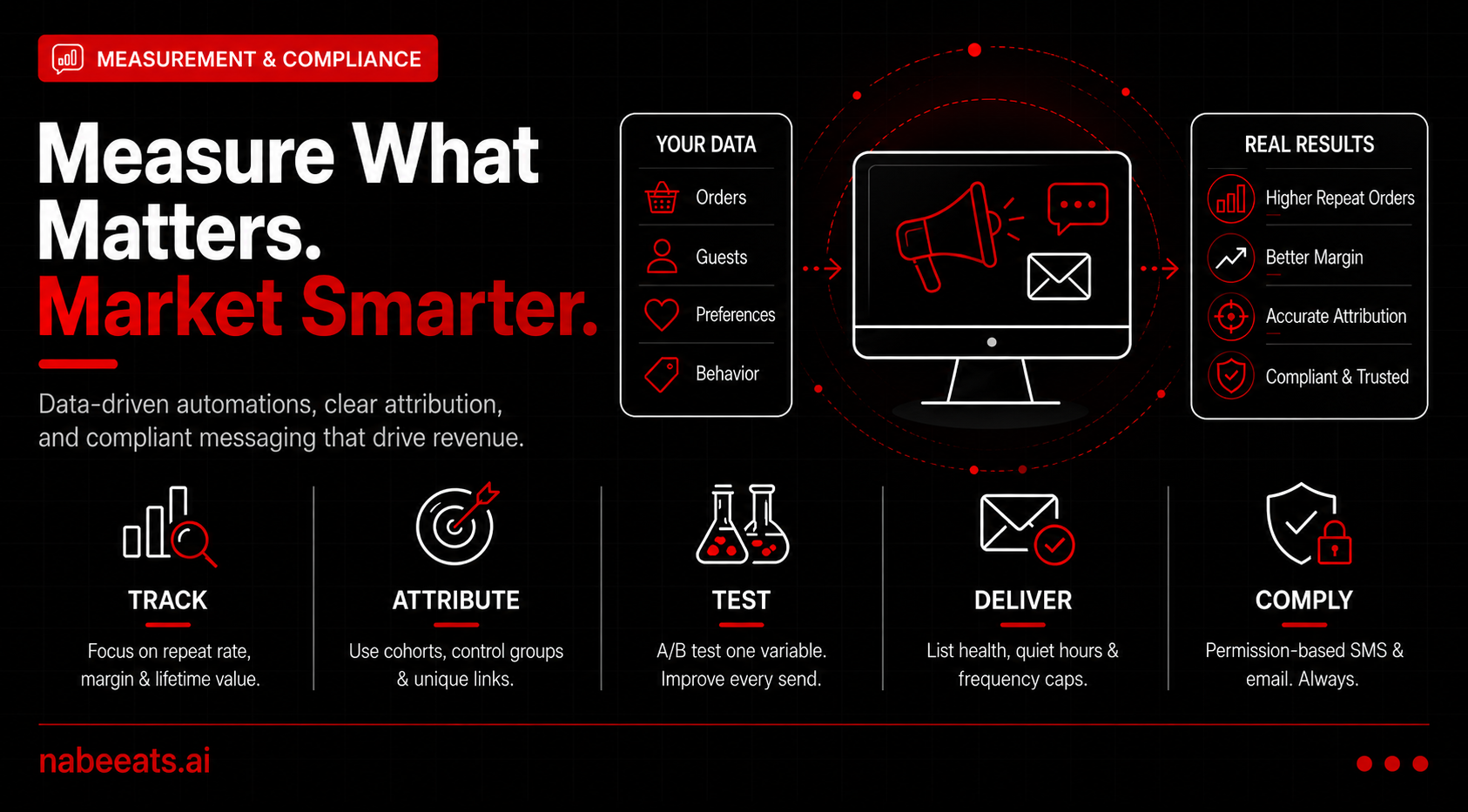
If restaurant automated marketing is your “always-on” growth system, measurement proves it pays for itself. Without a tight KPI set and basic attribution, you’ll argue about opens and clicks instead of repeat visits, margin, and guest lifetime value.
This section gives you a framework you can run from POS and online ordering data. It also includes a checklist for email/SMS compliance and deliverability so you can document consent and identify which automation creates incremental revenue.
1) Core KPI set for lifecycle automations (the numbers that matter)
Every automation should roll up to a small KPI set. Track by channel (email vs SMS), segment (new vs returning), and automation (welcome, winback, VIP).
Operator tip: add one profitability KPI: contribution margin per redeemed offer. Tie redemptions to product mix and daypart so you know whether you’re filling slow periods or subsidizing peak demand.
2) Attribution and incrementality basics (so you don’t fool yourself)
Last-click attribution over-credits short-window channels. Use a lightweight incrementality approach: consistent cohorts and a control.
Example: A 45-day winback SMS shows $8,000 in last-click sales. A 10% holdout shows exposed guests produced $6.40 more revenue per eligible guest than control over 7 days. If you messaged 1,000 eligible guests, incremental revenue is ~$6,400. Subtract offer cost to get incremental profit.
Tracking discipline makes attribution believable. Use unique short links per automation (and ideally per segment) so clicks and downstream orders can be tied back to the exact send, not just “SMS” as a channel.
3) A/B testing plan (one variable at a time)
Test one variable at a time and write down the hypothesis before launch. Keep everything else constant so you can trust the result and roll the winner into your automation template.
What to test next (fast, high-impact): (1) offer vs no offer, (2) personalization tokens (first name, favorite item, last order) vs generic copy, (3) send time (late morning vs mid-afternoon vs early evening) within your quiet hours and daypart capacity.
Documentation habit: keep a testing log: date, segment, trigger, variable, winner, and what you changed next.
4) Deliverability and list health (your messages can’t convert if they don’t land)
Deliverability is operational. When list quality slips, bounces rise, complaints increase, engagement drops, and filtering gets harsher.
Operator reality check: if you stack automations, use a “message governor” so a guest doesn’t get three texts in two days.
5) Compliance overview (non-legal advice): SMS, email, and privacy discipline
This is not legal advice. Treat compliance as part of the brand experience: respect permission, quiet hours, and opt-outs.
SMS (TCPA/CTIA concepts)
Compliance subsection: build your SMS program around provable permission. No marketing texts without clear, documented permission tied to a specific phone number, plus an easy opt-out in every campaign.
CTIA guidelines SMS marketing expectations push transparency: identify your brand, state message frequency, disclose that message/data rates may apply, link to terms/privacy, and make HELP/STOP work consistently.
Where to capture consent (make it easy, but consistent):
Examples of compliant opt-in/opt-out language (adapt with counsel):
Restaurant SMS marketing sample library (copy/paste) works best when guardrails are baked in. Keep most marketing texts to 120–160 characters, include your brand name, and use a tracked short link (unique per automation) so you can measure clicks and downstream orders.
Guardrails that keep these messages compliant and effective: only send marketing SMS to opted-in numbers, apply quiet hours by local time (for example, no sends before 9am or after 8pm), and enforce a global frequency cap so automations don’t stack.
Link tracking note: use a dedicated domain/shortener and append identifiers (campaign/automation/segment) so POS and online ordering can attribute orders back to the exact SMS, not just “text message.”
Suppression rule reminder: apply quiet hours and frequency caps at the account level, not per automation.
Email (CAN-SPAM basics)
Privacy expectations and data retention
6) Reporting cadence and dashboarding (weekly ops vs monthly strategy)
Automation fails when reporting is missing or overly complex. Use two views: a weekly operator dashboard and a monthly strategic review.
Weekly operator view (30 minutes)
Monthly strategic review (60–90 minutes)
What to do when metrics dip: diagnose: (1) deliverability, (2) audience quality, (3) frequency, (4) offer fatigue, (5) operational mismatch. Fix the root cause, then retest.
With measurement, holdouts, and permission-based messaging in place, you remove two major failure points. You’ll reduce false attribution and compliance risk in restaurant automated marketing. Next, we’ll answer the operator questions that come up before implementation—cost, integrations, timelines, and what to do when data is messy.
Frequently Asked Questions
Does restaurant automated marketing need real-time POS integration, or is nightly sync enough?
Nightly sync covers most restaurant automated marketing: welcome, birthday, winback, and post-visit feedback. Real-time matters for “right now” triggers like abandoned cart, same-day bounceback, or instant VIP recognition. If real-time isn’t possible, start with nightly sync via exports or middleware, then upgrade after you’ve proven lift.
What if my POS data is limited (no email, missing phone numbers, or no item-level detail)?
You can still run effective automations with minimal fields like visit date, check total, location, and channel. Capture email/SMS via online ordering, WiFi, or loyalty at the point of value (receipt link, points, reorder). Without item-level data, segment by spend and frequency, then personalize with timing and location-specific offers.
How much should I budget for restaurant automated marketing, and what’s the “start small” path?
Most operators can start lean and scale: roughly $500–$2,000/month for email/SMS plus a restaurant CRM and/or restaurant loyalty program software, with ~10–35 setup hours depending on integrations. Start with one channel and 2–3 automations (welcome, winback, birthday), then add paid campaigns or deeper personalization once deliverability and opt-ins are stable. If you’re evaluating the best restaurant marketing automation software, prioritize tools that reduce manual list work, keep consent synced, and make frequency caps easy to enforce.
How fast can I launch my first automations, and what does early success look like?
Expect 1–2 core automations live in 7–21 days once data flows, consent is clean, and templates are approved. Early wins: list growth, consistent sends, fewer “dead” profiles, and higher repeat visits among messaged guests. Use holdouts so you’re measuring incremental lift, not just last-click attribution.
How do I handle guest consent and opt-outs without breaking the system?
Use one source of truth for consent and sync opt-outs to every tool so restaurant automated marketing doesn’t resubscribe people. Keep separate permissions for email vs SMS, and confirm your restaurant CRM enforces suppression across channels. Train staff with: “Want receipts and rewards by text or email?”
For SMS, treat compliance as part of your data model: TCPA compliance restaurant SMS generally requires prior express written consent, clear disclosures, and an easy opt-out. Follow CTIA guidelines SMS marketing for transparency and how to stop. Align to the strictest standard and document consent capture.
Double opt-in is a smart risk-reducer for restaurant SMS opt-in. A confirmatory “Reply YES to subscribe” step helps prove intent, improves list quality, and reduces complaints. Store timestamp/source for auditability.
Capture consent where guests already take action: online ordering checkout, guest WiFi portal, QR code at the table, receipts, and loyalty signup. Store the source on the profile. Suppression rules protect trust and deliverability: enforce quiet hours, frequency caps, and global opt-outs across all locations and tools.
What’s the simplest way to avoid messy integrations when I’m implementing restaurant automated marketing?
Pick one primary guest ID (phone or email) and enforce it across POS, online ordering, and loyalty. Start with one connector path (POS → restaurant CRM) before adding tools, and avoid parallel imports that create duplicates. Document field mapping early (including refunds/voids) so reporting and segmentation stay trustworthy.
What’s the best restaurant marketing automation software?
The best restaurant marketing automation software is the one that fits your POS and data: reliable POS connectivity, a usable restaurant CRM, built-in segmentation, and reporting you’ll actually check weekly. Shortlist vendors by your top use cases and confirm they support your POS natively or via a proven connector. Validate restaurant POS integration requirements up front: guest identifiers, refunds/voids, location IDs, and consent/opt-out sync across email and SMS.
How much does it cost?
Total cost depends on channels, locations, and messaging volume: software fees, SMS usage, and one-time setup/migration. Vendors price per location, per profile, or by message volume, so the cheapest plan can rise as your list grows. If you’re adding restaurant loyalty program software, confirm whether rewards funding or extra POS connectors add costs.
How long to implement POS integrations?
Most POS integrations take 2–6 weeks depending on your POS and whether you need item-level data. Plan time for field mapping, consent sync, and QA (test orders, refunds, voids, and multi-location edge cases). If timelines slip, launch with nightly sync and upgrade later.
Email vs SMS—what should I start with?
Start with the channel you can permission and use consistently: email is cheaper and better for longer content; SMS is faster for time-sensitive offers. Many restaurants begin with email for welcome/winback, then add SMS for bouncebacks once opt-in is strong. Tie both back to the same restaurant CRM profile so frequency caps and suppression rules work.
What should a restaurant welcome text say?
A great welcome text confirms value, sets expectations, and gives one simple next step. Keep it short, include your brand name, and remind them how often you’ll text.
Example 1: “Thanks for joining [Restaurant Name] texts! Expect 1–2 msgs/week. Here’s $5 off your next visit this week: [link]. Reply STOP to opt out.”
How many messages per week is too many?
Too many is when opt-outs and complaints rise faster than incremental visits. For most brands, 1–2 SMS/week (plus triggered messages like receipts, birthdays, or order updates) is a safe baseline, while email can often run 1–3 sends/week depending on content and segmentation. Use frequency caps and suppression rules so a guest doesn’t get a winback, a promo, and a feedback request in the same 48 hours.
Example: “Max 2 SMS per 7 days, max 3 emails per 7 days, and never more than 1 message/day across channels.”
What’s a good winback offer?
The best winback offer is the smallest incentive that reliably restarts a habit. Start with a “soft” winback (new menu, event, reminder) and escalate only for true lapsers. This protects margin and reduces discount dependency while keeping automated email campaigns restaurants can run year-round.
Example: “Come back this weekend: $10 off $30+ (dine-in or pickup). Expires Sunday. Use code: BACK10 [link].”
How do I personalize messages by menu item?
Use item-level POS data to trigger “next best message” based on what they buy. Map items into categories (tacos, bowls, kids, vegan, cocktails) and build branches in your automation tool. If item-level data is messy, start with top 20 items and expand once reporting is stable.
Example: “Loved the [Burger Name]? Next time, add bacon + fries for $3 (this week only): [link].”
Where can I find a restaurant SMS marketing sample and email template that actually converts?
Start with one reusable template per trigger, then iterate with holdouts. A solid restaurant sms marketing sample is short, branded, and action-first; a strong email version adds context without changing the core offer. Build these inside your Welcome, Bounceback, and Winback automations so the same logic (timing, caps, suppression) applies across channels.
Example: “[Restaurant Name]: Today only—free [add-on] with any [entrée] after 4pm. Order: [link]. Reply STOP to opt out.”
How to avoid discount dependency?
Use discounts as a last-mile nudge, not the core strategy: segment by behavior, reward frequency (not just spend), and rotate value adds (early access, freebies, experiences). In your restaurant loyalty program software, emphasize points, tiers, and non-discount perks, and reserve coupons for true lapsers. Measure lift with holdouts so you don’t buy visits you would’ve gotten anyway.
Restaurant CRM vs loyalty program vs CDP—what’s the difference, and what do I actually need?
Think in terms of jobs-to-be-done, not buzzwords: a restaurant CRM stores guest profiles and powers segmentation and messaging; a loyalty program manages earning/burning, rewards rules, and member status; a CDP (customer data platform) unifies data from POS, online ordering, reservations, and ads for analytics and activation.
The right choice depends on your stack and data complexity: for repeat-visit automations, CRM + POS integration may be enough; for points/tiers and in-store redemption, loyalty is required; for multiple sources and duplicate identities, a CDP can unify. Buy the missing capability instead of paying twice for overlap.
Ready to move from planning to action? Follow the 30–60 day rollout plan: start with one high-impact automation, then scale once data, permissions, and frequency controls are stable.
The Bottom Line
You don’t need “more campaigns.” You need a POS-driven system that makes repeat visits predictable when your time is tight. This playbook walked you from definition to the right stack, then to core triggers, practical AI personalization, and the measurement/compliance guardrails that protect guest trust and your margins.
Use this 60-day checklist: 1) audit data + consent, 2) connect POS/ordering/CRM, 3) define key events, 4) launch two automations, 5) add three more, 6) test and iterate, 7) layer personalization, 8) review KPIs. Start with one channel and a few triggers, set frequency caps, and keep incentives measured.
Your next step: audit your POS/ordering fields today and choose your first restaurant automated marketing automation—welcome or winback.
.png)


.png)


