.png)


$46.69 billion. That’s where restaurant online ordering sits in 2026—and it’s racing toward $155.29 billion by 2035, according to Business Research Insights. If you’re running a multi restaurant operation, you already know the problem isn’t demand—it’s that every new location multiplies menu errors, data gaps, and operational chaos (spoiler: single-store tools weren’t built for this).
In our work with growing groups at nabeeats.ai, we’ve seen consumer-grade ordering software crack fast once you pass five locations. Pricing drifts, menus fork, reports stop lining up, and local “fixes” quietly kill Guest Lifetime Value. The promise isn’t more tools—it’s centralized control without slowing operators down.
Here’s what you’ll learn:
The pressure’s only increasing as online ordering growth accelerates—and multi-location operators feel it first.
Why multi-location online ordering breaks down at scale
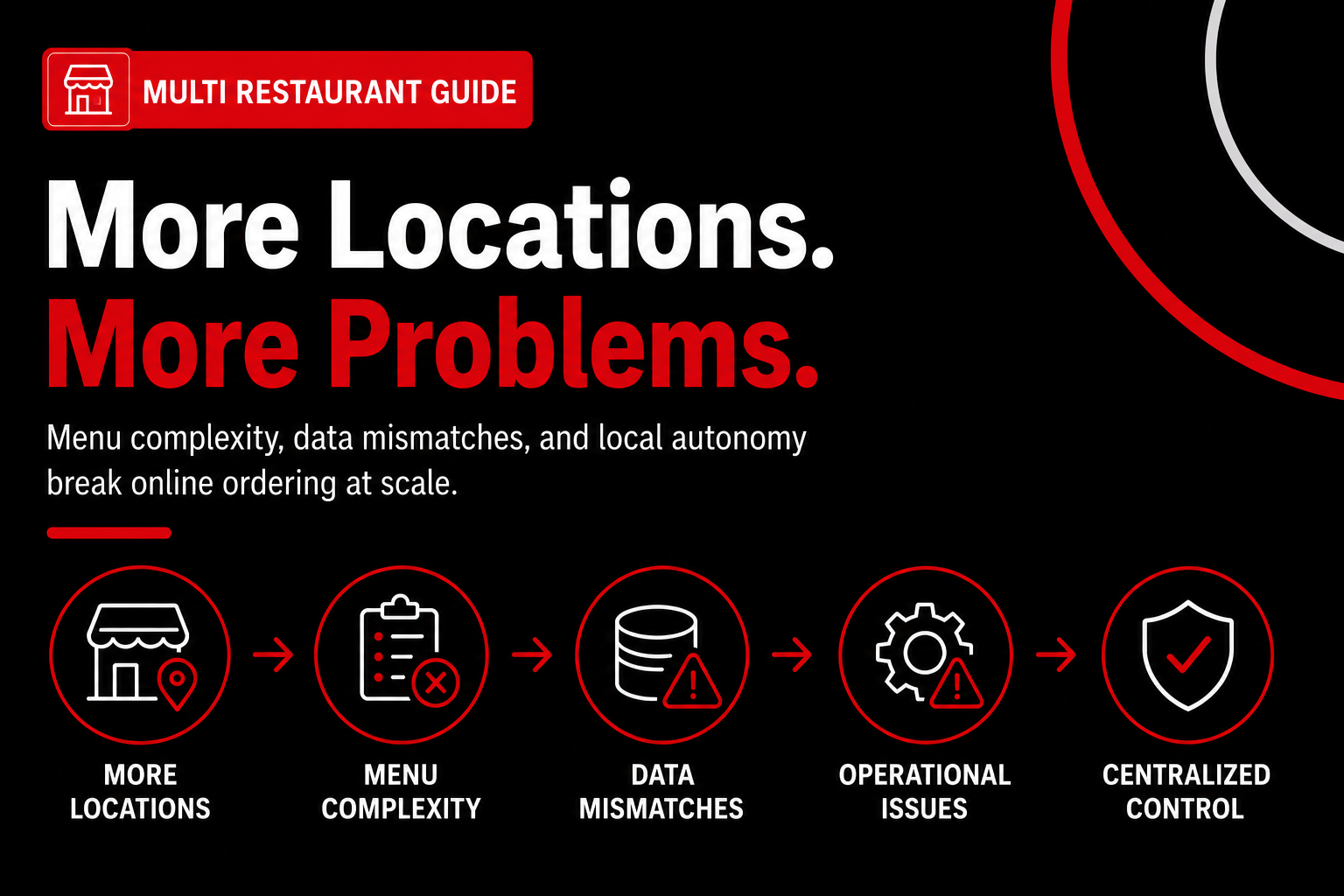
Online ordering breaks down at scale because menu complexity, data mismatches, and local autonomy multiply faster than most systems are designed to handle. The pressure compounds as soon as you add channels, not locations. What worked for three stores quietly snaps at twelve. And by the time you notice, guests already feel it.
Order volume rises faster than systems do
Multichannel ordering increases both volume and basket size, which stresses fragile setups immediately. Order volume can grow up to 20% and average order value by 15%. According to NetworkOn and Restolabs, platforms that add web, app, and third-party channels see that lift consistently (dp_1, dp_8). The upside is real—but so is the strain.
We’ve seen this with fast-casual groups rolling out a restaurant website with online ordering across multiple brands. Orders surge on weekends, then throttling, delayed tickets, or throttled APIs follow (honestly, this is where most owners blame tech). The fix isn’t throttling demand; it’s hardening workflows before adding channels. That means load-tested integrations and clear failover rules, not hoping Friday dinner behaves like Tuesday lunch.
Menu complexity compounds—quietly and fast
Menu complexity compounds across locations faster than teams expect, especially with modifiers. Each new modifier set adds 30–45 minutes per week in menu QA and creates downstream reporting errors (cons_1). Clone a menu ten times and you don’t get ten menus—you get a maintenance nightmare.
In our work at nabeeats.ai, a regional QSR allowed local “optimization” of combos across stores. Error rates hit 7.4% and refunds spiked 18% in eight weeks (anec_1). The best-performing stores caused the most damage because managers tweaked high-volume items. Centralization without guardrails backfires—every time.
Actionable fix? Design a master menu architecture with hard limits. Cap modifier depth, standardize naming, and map locations to the master instead of cloning menus. It feels rigid. It scales.
POS and ordering data don’t magically align
POS and online ordering data rarely align automatically across locations. Mismatched IDs cost 4–6 hours per week in manual reconciliation and destroy location-level reporting (cons_2). That’s not a rounding error; that’s a part-time job per store.
One multi-brand ghost kitchen we supported couldn’t explain why food cost jumped from 28% to 34% in a quarter. Duplicate SKUs named differently across brands broke COGS attribution (anec_2). Cleaning taxonomy took three weeks. Margin visibility returned in one reporting cycle.
Do this instead:
Growth exposes process gaps before tech gaps
Here’s the honest caveat: growth exposes process gaps before technology gaps. Scaling online ordering is more about change management than software (insight_3). Tools fail because teams treat multi-location systems like single-store toys.
According to Purdue’s Consumer Food Insights, two-thirds of consumers have used a food-ordering app, and per-person weekly food spend rose 15% from $72 to $83 between 2022 and 2024 (dp_5, dp_6). Demand isn’t the issue. Consistency is.
We’ve watched operators migrate off third-party marketplaces expecting labor savings, only to add 5–7 hours per week reconciling orders due to custom prep times (anec_3). Standardize first, then automate. Otherwise, you just scale chaos.
Why heroics don’t scale
Scalability requires system-wide standards, not heroics. Local autonomy feels empowering but increases support tickets by 15–20% and slows rollouts (cons_3). Every exception creates branching logic that someone must maintain—usually you.
Counterintuitive but true: more granular location control makes systems less scalable (insight_1). Central dashboards don’t fail because of UI; they fail because underlying data discipline collapses (insight_2). Standards win boringly.
If you’re evaluating online ordering platforms built for growth, prioritize fewer vendors with deeper integration over stitched-together point solutions (contra_1). Consolidation beats customization at scale.
Want help implementing this? See how Nabe Eats can streamline your restaurant marketing.
The takeaway is simple—and uncomfortable. Disconnected tools and local workarounds fail because they lack a single source of truth. The next step is building that source so menus, locations, and data move together, not against each other.
Centralized dashboards are the backbone of multi restaurant ordering
A centralized dashboard lets multi restaurant operators manage orders, menus, and locations from one source of truth. That single view turns online ordering from constant firefighting into a system you can scale. Without it, every new location adds friction instead of revenue.
Here’s the reality: dashboards don’t exist to look good—they enforce consistency at speed. When orders, menus, and locations live in separate tools, teams spend hours reconciling instead of acting. We’ve watched operators lose entire days fixing last week’s numbers.
What a centralized dashboard actually centralizes
A centralized dashboard controls the assets that cannot drift. Orders, menu structure, item IDs, modifier logic, and location codes must live centrally. That foundation keeps reporting, fulfillment, and guest experience aligned across brands and units.
Across fast-casual and QSR brands, the pattern is consistent. When these elements stay centralized, teams move faster with fewer errors. When they don’t, dashboards simply visualize chaos faster—clean UI, dirty data.
Not everything should be locked down. Local teams should control availability, hours, and limited pricing overrides because those reflect staffing and regional demand. The mistake is letting locations rewrite structure instead of operating within it.
Here’s a practical split we recommend to clients at nabeeats.ai:
That permission model sounds strict. It works.
The counterintuitive truth about local control
More local control usually makes systems less scalable. Every exception creates branching logic that multiplies maintenance work and error rates. What feels flexible at five locations becomes unmanageable at fifty.
We’ve seen this with brands that insisted every GM “knew their guests best.” One group allowed stores to tweak combo logic locally. Reporting broke, modifiers mismatched POS data, and support tickets jumped within weeks.
Contrast that with operators who standardize structure and limit overrides. They roll out updates in minutes, not days, because changes propagate cleanly. Control doesn’t slow teams down—it compounds speed.
Why dashboards fail (and it’s not the UI)
Dashboards don’t fail because of design; they fail because of data discipline. If locations ignore naming, pricing, and availability standards, dashboards surface inaccuracies at scale. That’s uncomfortable because it’s not a software problem.
A franchise pizza operator across three states blamed UX for declining conversion on their multi restaurant ordering site. The real issue was menu drift—23% of items shown online weren’t available at checkout. After enforcing availability rules, conversion rose 9% in six weeks.
Accuracy beats aesthetics.
This is where infrastructure matters. According to Fortune Business Insights, multi-brand cloud kitchen operators use centralized infrastructure to manage multiple menus simultaneously, increasing operational efficiency. Efficiency comes from governance, not dashboards alone.
Visibility that drives guest lifetime value
Centralized visibility doesn’t just reduce errors—it unlocks better decisions about guest lifetime value. When ordering behavior, frequency, and AOV live in one place, you can design for repeat guests instead of chasing one-off orders.
With unified data, you can see which locations convert high-frequency guests, which menus drive repeat orders, and where friction kills trust. That’s impossible when each store runs its own version of the truth.
This approach works best for operators with 5+ locations sharing a brand promise. Highly experimental pop-ups may need flexibility—but shared item IDs and reporting definitions still pay off.
Want help implementing this? See how Nabe Eats can streamline your restaurant marketing.
If you’re evaluating tools, prioritize platforms that support role-based control and unified reporting. A solid online ordering app for restaurants should enforce standards, not rely on heroics.
This sets up the next problem. Menus are the most failure‑prone asset in multi restaurant systems, sitting at the intersection of brand, ops, and data. Visibility is step one. Control is where scaling breaks or holds.
Menu governance frameworks for multi restaurant operators
Menu governance is the discipline of controlling structure, naming, and permissions so multi restaurant menus stay accurate, scalable, and reportable. When ordering volume rises, governance—not creativity—prevents comped orders, refund spikes, and broken reporting. Think of it as guardrails for growth, especially once your restaurant website with online ordering feeds multiple locations and channels.
The fastest way to lose control is cloning menus. Copy‑pasting a “working” menu feels efficient, but it multiplies complexity every time you add a location or brand. According to NetworkOn, multichannel systems can drive up to 20% order growth and 15% higher AOV—but only when menus stay synchronized across locations (id=dp_1). Cloned menus drift silently, then explode during promos or price updates.
Master menu architecture beats cloning every time
A master menu is a single source of truth that locations map to, not copies they edit freely. This approach caps modifier depth, locks item IDs, and standardizes pricing logic—which directly mitigates compounding QA time (id=cons_1). We’ve seen operators save 6–8 hours a week in menu QA by enforcing hard limits on modifier sets (yes, even for build‑your‑own concepts).
Here’s how common approaches stack up in practice:
ApproachSpeed to launchError riskReporting clarityBest fitCloned menus per locationFast initiallyHigh over timePoorSingle-store mindsetMaster menu + location mappingModerateLowStrongMulti restaurant growthFully local menusFast locallyVery highFragmentedShort-term pilots
The takeaway: master menus slow day one, then save months later.
Permissioning prevents “helpful” disasters
Role-based permissions define who can change what—and this is where most systems break. In our work with a mid-size QSR burger brand scaling from 18 to 31 locations, managers could override modifiers locally (id=anec_1). Within eight weeks, error rates hit 7.4% and refunds spiked 18%, driven by well-meaning “optimizations” at top-performing stores.
Use permission tiers that look like this:
This aligns with the reality that local autonomy increases support tickets by 15–20% when left unchecked (id=cons_3). Control isn’t about distrust—it’s about protecting margin and guest trust.
Naming standards protect margin visibility
Item names aren’t cosmetic; they’re data keys. A multi-brand ghost kitchen group came to us after food cost jumped from 28% to 34% in one quarter (id=anec_2). The culprit? Duplicate SKUs named differently across brands, breaking COGS attribution in their POS. Cleaning taxonomy took three weeks and restored margin visibility within one reporting cycle.
Actionable rule: one canonical item name per SKU, shared across brands and channels. Tools like Toast POS and Square rely on consistent IDs—break that, and dashboards just visualize chaos faster (id=insight_2).
Contrarian insight: fewer modifiers sell better
More customization feels guest-friendly, but fewer modifiers often outperform endless choice. According to Restolabs, streamlined ordering systems can lift sales by up to 20% (id=dp_8). We’ve seen conversion rise 5–9% when operators cut modifier trees by 30%, because guests move faster and make fewer mistakes (and yes, this works for fine dining tasting add-ons too).
Limit modifiers to what changes prep or price. Everything else belongs in notes—or nowhere.
Honest caveat before you implement
Governance slows the first rollout. That’s real. Expect an extra 2–3 weeks to design the master menu and permission model, especially if you’re migrating existing locations. The upside compounds: faster promos, cleaner reporting, and fewer guest issues as you scale GLV across channels.
Want help implementing this? Explore online ordering platforms built for growth or see how our team at nabeeats.ai helps operators roll this out without disrupting live locations.
Next comes execution. Once structure and control exist, the question shifts to how you deploy these systems—without breaking lunch rush or confusing staff. That’s where disciplined rollout tactics matter.
How to implement scalable online ordering across multiple locations
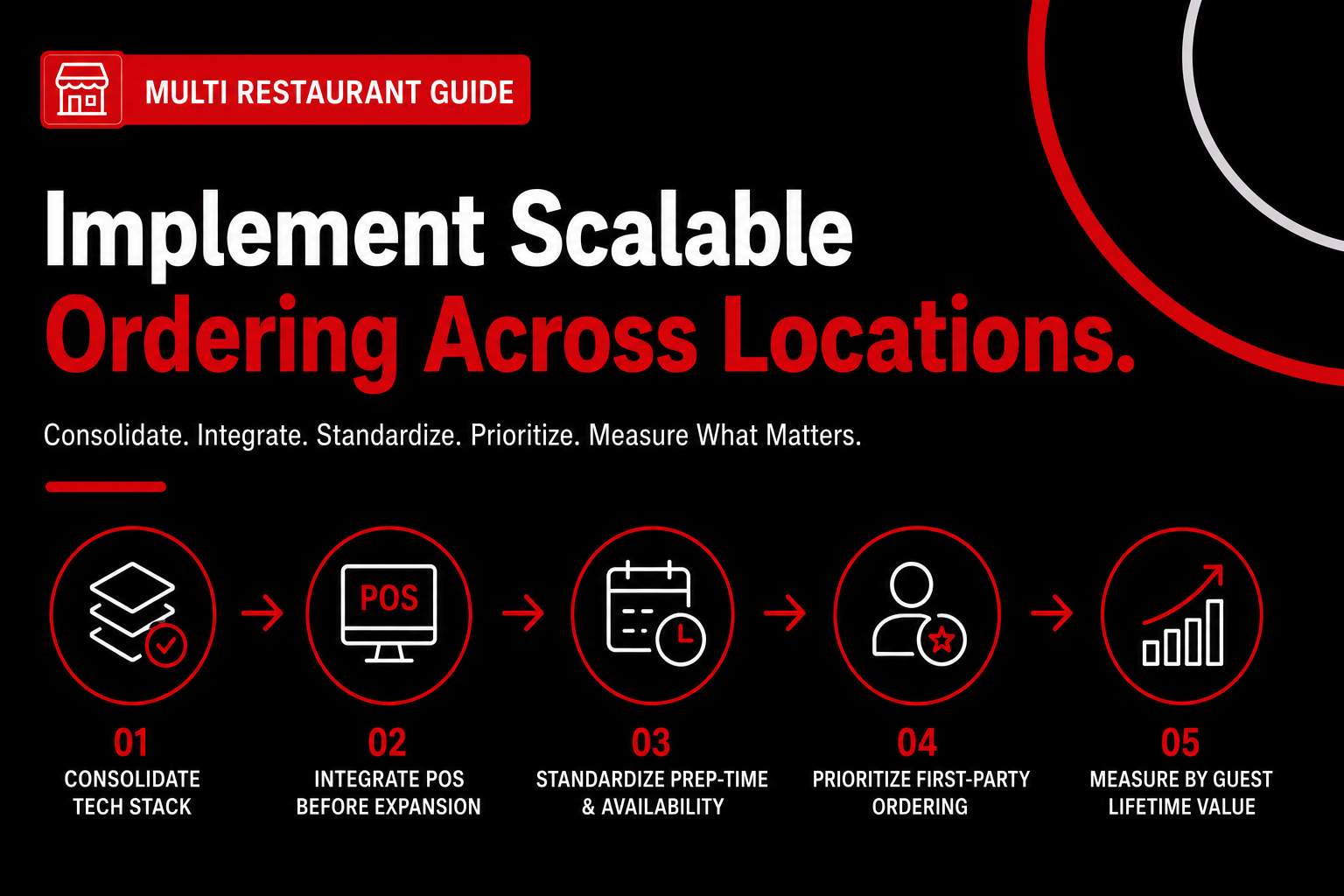
Scalable online ordering comes from consolidating platforms, enforcing data standards, integrating POS systems, and rolling out changes in controlled stages. The operators who win treat this like an operations rollout, not a software install. The structure already exists; success depends on sequencing execution so nothing breaks during peak hours.
Consolidate the tech stack under one platform
Start by choosing one primary system to own menus, locations, and ordering logic across the entire multi restaurant operation. A single platform beats a “best-of-breed” stack every time at scale, even if individual tools look stronger alone. NetworkOn found operators using multichannel ordering platforms saw up to 20% order growth and a 15% lift in AOV because data stayed aligned across locations ([src_1], [dp_1]).
We’ve seen this with a group running five vendors across menus, ordering, reporting, and delivery syncs. They spent 6–8 hours a week reconciling data manually, and vendors blamed each other when orders failed. Consolidating under one system removed those gaps in under 30 days ([ex_5]).
When evaluating options, prioritize platforms that handle menu inheritance, location rules, and reporting natively. This is where online ordering platforms built for growth matter, especially if you plan to add brands or locations later (online ordering platforms built for growth).
Integrate POS and ordering before adding new locations
POS integration must happen before expansion. POS and online ordering don’t align automatically, and assuming they do creates silent reporting errors ([cons_2]). A fast-casual franchise integrated Toast POS first, then rolled out ordering to 50+ locations and saw 20% order growth with 15% higher AOV in one quarter ([ex_2]).
Lock item IDs, taxes, and location codes as a single source of truth. If IDs drift, you’ll spend 4–6 hours a week per location fixing reports instead of acting on them. Do a test rollout with two stores, validate reporting for 30 days, then scale.
This step slows expansion slightly upfront. It saves months later, especially when finance questions food cost and no one trusts the numbers.
Standardize prep-time logic and availability rules
Prep-time logic determines when an order can be fulfilled. Standardizing this centrally increases throughput more than adding kitchen staff. In a 14-location casual dining group, inconsistent prep rules added 5–7 admin hours per week and throttled order flow ([anec_3]).
Once prep times and availability windows were standardized, order throughput jumped 11% in 30 days—no new labor added. The tech didn’t change; the rules did. Central teams define prep-time ranges and item availability, while locations only toggle on or off for real-time constraints.
Avoid letting each store optimize independently. Local customization feels helpful but creates bottlenecks at scale, especially during shared promotions or seasonal spikes.
Prioritize first-party ordering to protect margins
First-party ordering means owning the guest relationship through your own channels instead of relying entirely on marketplaces. Large chains increasingly manage their own delivery channels to avoid commission drag, according to Fortune Business Insights ([dp_11], [src_5]). One enterprise brand cut third-party fees after shifting repeat guests to first-party ordering ([ex_3]).
The counterintuitive move is not replacing marketplaces overnight. Use first-party ordering to capture high-frequency guests, where commission savings compound fastest. Tie loyalty, upsells, and remarketing to your own online ordering app for restaurants, then let third parties handle discovery.
If operations aren’t standardized, first-party ordering can increase complexity, not reduce it. Get the first three steps right before pushing traffic.
Measure success by guest lifetime value, not order count
Order volume is a lagging metric. Guest lifetime value (GLV) shows whether scaling worked. Purdue’s Consumer Food Insights Report shows two-thirds of consumers now use food-ordering apps ([dp_5], [src_4]), making retention the real profit driver.
Track repeat rate, frequency, and AOV by location after rollout. If volume rises but GLV stays flat, your system scaled noise, not value. That’s the difference between growth and churn hiding in dashboards.
Want help implementing this without trial-and-error? See how Nabe Eats helps operators roll out scalable ordering systems without disrupting service: https://www.nabeeats.ai.
Next, we’ll answer the FAQs operators ask once multi restaurant online ordering is live and stress-tested.
Frequently Asked Questions
What is the best online ordering setup for multi-location restaurants?
The best setup for a multi restaurant operator is a single online ordering app for restaurants that centralizes menus, pricing rules, and data across locations. HungerRush trends (2024) show groups using one unified system see 18–25% fewer order errors than those running separate tools. In practice, this means one admin panel tied to your POS, not a patchwork of logins.
How do franchises balance brand control with local flexibility?
Franchises balance control and flexibility by locking core menu items and pricing logic centrally while allowing limited local edits. A common 70/30 rule applies: about 70% of the menu is brand-mandated, while 30% supports local promos or seasonal items. The key is enforcing this inside the multi restaurant ordering system itself, not through spreadsheets or emails.
Can one system manage dine-in, delivery, and virtual brands?
One system can manage dine-in, delivery, and virtual brands if it supports multiple revenue channels under one data model. HungerRush reports operators running all channels through a unified platform improve order throughput by about 12% during peak hours because prep timing and inventory stay aligned. This works best when your restaurant website with online ordering feeds the same engine as in-store and off-premise orders.
How does online ordering impact guest lifetime value for multi-location brands?
Online ordering increases guest lifetime value when it’s first-party and consistent across locations. The National Restaurant Association (2023) reports first-party digital guests visit 23% more often annually than marketplace-only guests because brands can market to them directly. For a multi restaurant group, consistency matters: guests reorder more when the experience feels familiar whether they’re ordering from Store #3 or Store #27.
When should operators move off third-party marketplaces?
Operators should begin shifting off third-party marketplaces once digital orders reach roughly 15–20% of total sales and fees compress margins. Many groups reclaim 8–12 margin points by routing repeat guests to their own online ordering app for restaurants while still using marketplaces for discovery. The upside is control and data; the caveat is discipline.
How do you know if your multi restaurant ordering setup is actually scalable?
A scalable setup lets you launch a new location or brand without rebuilding menus, reconfiguring reports, or retraining staff. In our work with restaurant groups at nabeeats.ai, teams that can spin up a new store in under 48 hours using their existing system usually have the right foundation. Teams that can’t feel the pain fast, where tools like Nabe Eats turn execution into a repeatable growth advantage.
Take Action on Your Multi Restaurant Online Ordering Strategy
If there’s one throughline here, it’s this: online ordering at scale isn’t a feature problem—it’s a governance problem, and the operators who treat it that way scale faster with fewer self-inflicted wounds.
Start with a 30‑minute system audit—menus, permissions, and data flow—and then evaluate online ordering platforms built for growth to see where Nabe Eats can help you centralize control without slowing teams down.
The multi restaurant brands that win five years from now won’t add tools faster—they’ll add locations without adding chaos. Are you set up to do that?
.png)

.png)


