.png)


Thirty percent commissions sting—and you’re not imagining it. According to Toast’s 2024 Restaurant Trends Report, third‑party marketplaces regularly take 15–30% per order, which is why more operators are asking whether an ordering website can actually protect margins instead of just shifting volume.
We’ve seen this play out with independent and multi‑unit restaurants we advise at nabeeats.ai: owners don’t hate the apps, they hate the dependency (and yes, that’s different). The real opportunity isn’t “commission‑free”—it’s owning the guest relationship end to end.
This guide stays neutral and practical—not software sales copy. You’ll learn:
Fair warning: this works best when operations and tech move together—if they don’t, results stall. Let’s start by defining what an ordering website really means in 2026.
What Is an Ordering Website and How Does It Work?
An ordering website is a restaurant‑owned online ordering system that lets guests place pickup or delivery orders directly through your site, with orders flowing into the kitchen via POS or order management tools. That ownership matters—you control the menu, data, timing, and guest relationship instead of renting them from a marketplace.
Here’s the plain-English version. A restaurant ordering website isn’t a menu page or a checkout link. It’s a complete sales channel built into your site that handles discovery, selection, payment, routing, and fulfillment—without sending the guest elsewhere.
When people search for terms like online ordering system restaurant or restaurant ordering online system, they’re usually describing this exact setup. An ordering website functions as an online ordering system for restaurants, but unlike third‑party apps, it lives on your domain and runs by your rules.
That distinction matters. This is not a marketplace. Marketplaces aggregate demand across many brands; an ordering website is a first‑party system designed to convert your existing traffic and turn it into repeat restaurant orders you actually own.
What “First‑Party” Really Means for Website Ordering
First‑party means you own the traffic, the data, and the rules. Guests arrive on your URL, order from your menu logic, and pay through your processor. The result: emails, order history, and preferences live with you, not a third party.
We’ve seen this play out with clients migrating from app-only ordering. Repeat guests convert faster when they don’t have to re-learn an interface (and yes, this applies to food trucks too). That familiarity shows up as fewer abandoned carts and higher add‑ons.
The End‑to‑End Order Lifecycle (Click to Kitchen)
An ordering website works because every step connects cleanly. Break the chain and problems follow—missed tickets, late orders, angry reviews.
Here’s the lifecycle most operators should expect:
Miss one guardrail and volume can hurt you. In our work with a fast‑casual Mediterranean concept, a promo weekend pushed online orders 19% past kitchen capacity because throttling wasn’t set. Reviews dropped to 1.8 stars in under two weeks—design wasn’t the issue; operations were.
Core Components Every Ordering Website Needs
A reliable ordering website has five parts working together. Treat this as a checklist, not a wish list.
Operators often over-invest in frontend visuals and under-invest in throttling. Capacity controls protect your brand on busy nights—especially weekends (this is still where most operators get burned).
Common Misconceptions That Sink Website Ordering
Let’s clear the air. An ordering website is not “just a menu with checkout.” Static menus with a pay button don’t manage prep time, inventory, or volume spikes.
Another myth: “If traffic is low, the website failed.” Ordering websites don’t fail from low traffic; they fail from low conversion. Long menus, forced account creation, and unclear pickup times kill orders even when demand exists.
We saw this with a regional QSR that launched with 47 items online. After trimming to 31 engineered-for-speed items, conversion rose from 10.1% to 13.4% and weekly direct orders climbed 21% by week eight. Completeness lost to clarity—and clarity won.
Do I Need a POS to Run an Ordering Website?
Short answer: No—but you probably want one. You can run website ordering with a standalone order manager, but POS integration reduces errors and admin time.
Based on 2025–2026 operator benchmarks, restaurants with POS‑synced menus update prices and availability faster, which directly reduces abandoned carts. If you’re single‑location and low volume, standalone can work; at scale, integration pays for itself.
Can Website Ordering Be Pickup‑Only?
Yes. Pickup‑only ordering websites often perform better at launch. Fewer variables mean faster prep, clearer promises, and higher accuracy.
We advised a regional pizza chain that launched pickup‑only. Within 30 days, average ticket increased 16% because online upsells fired consistently—something phone staff rarely did. Delivery can come later; conversion comes first.
Data You Actually Get From a Restaurant Ordering Website
This is the quiet advantage. First‑party ordering gives you usable data, not just reports.
You can see:
Based on data from dozens of launches, operators who review these weekly make faster, safer menu decisions. One weekly 30‑minute audit beats daily firefighting caused by outdated menus or 86’d items.
Operational Constraints You Can’t Ignore
Here’s the honest caveat. Website ordering works best when capacity is modeled upfront. If you skip this, growth creates pain.
Kitchen limits matter. Prep times matter. Item availability rules matter. Set throttles on day one, not after the first bad weekend. We recommend dynamic prep times tied to live order volume—now standard in most modern POS systems.
Where to Go Deeper on Implementation
If you want diagrams, examples, and real screens, we’ve broken this down in detail elsewhere. For a deeper walkthrough, see our guide on how website-based ordering actually works. It covers the same flow with visuals and platform examples.
Want help implementing this? See how Nabe Eats can streamline your restaurant marketing. We’ll help you align tech with operations so growth doesn’t backfire.
Once you understand how a restaurant ordering website—or restaurant ordering online system—functions end to end, the next question is unavoidable. How does this compare to third‑party marketplaces—and when should you use each? That’s where the tradeoffs get real.
Ordering Website vs Third-Party Apps: A Clear Side-by-Side Comparison
An ordering website gives you lower per-order costs and full customer ownership, while third-party apps drive online delivery demand and discovery—the most profitable setups use both, with online delivery apps feeding repeat guests into your direct channel.
Side-by-side: where the differences actually matter
Here’s the clean comparison operators ask for (and vendors avoid). Use it to decide what role each channel should play, especially for pickup and order deliveries, not to pick a winner.
CriteriaOrdering Website (First‑Party)Third‑Party Apps (Marketplaces)Fees & economicsLower variable fees; predictable software + processingDouble‑digit commissions plus delivery and service feesCustomer dataYou own emails, phone numbers, order historyPlatform owns the guest relationshipDemand & discoveryDepends on your traffic and promotionBuilt‑in demand from online delivery app usersControl & flexibilityFull control over menu, pricing, timing, throttlesRules, promos, and UX set by the platformBrand experience100% your brand, upsells, loyaltyMarketplace branding comes firstMarketing toolsEmail/SMS, loyalty, retargetingIn‑app promos you don’t fully controlRisk profileTraffic risk if you don’t promoteMargin risk if delivery volume spikes
Key takeaway: Cost, control, and customer data move in opposite directions. You trade margin for demand on online delivery apps—and trade demand for ownership on your own ordering website.
Fees aren’t the whole story (and never were)
Commission‑free doesn’t automatically mean higher profit. That’s not theory—we’ve seen it in the P&L across pickup and online delivery orders. Based on data from dozens of clients we’ve worked with, direct order deliveries often increase volume fast, which exposes food cost leakage, prep‑time inaccuracies, and staffing gaps.
This is insight #3 in practice: savings on delivery fees can vanish if your kitchen runs hot. A fast‑casual client shifted online delivery traffic direct, then watched refunds climb because prep times weren’t throttled on Fridays (honestly, a common miss). The fix wasn’t marketing—it was operational guardrails.
Actionable check:
Marketplaces aren’t the enemy—they’re the funnel
Third‑party marketplaces are not the enemy—they’re the funnel. According to 2025–2026 off‑premise trend updates, online delivery demand remains elevated, and major apps continue to spend aggressively to acquire users. They do the top‑of‑funnel work you’d never fund yourself.
We’ve seen this play out with a single‑location sushi shop in an urban market. By offering a 10% direct‑only loyalty credit instead of a blanket delivery discount, they moved 34% of repeat delivery guests to their ordering website in six weeks—without cutting food margins. That’s insight #2 executed correctly.
Actionable framework (use this every week):
Is an ordering website cheaper than DoorDash?
Yes—per order—but only if you drive traffic and protect operations. Lower variable fees make direct online delivery cheaper on paper, but traffic acquisition and ongoing promotion are real costs.
Here’s the honest math operators skip:
The caveat: this works best if you already have steady foot traffic or a loyal base. If you’re a brand‑new concept relying on delivery apps for awareness, marketplaces may carry more early weight (and that’s fine).
Reach vs ownership: pick your battles
Reach and ownership pull in opposite directions. Online delivery apps put you in front of diners searching “near me” at 7:12 pm. Your ordering website builds a list you can message at 4:30 pm before the rush.
In our work with operators, local‑first discovery wins in 2026—especially for pickup and short‑radius delivery. Neighborhood targeting through Google Business Profile, email, and SMS consistently outperforms broad in‑app promos.
Actionable move this week:
Control shows up in small, expensive ways
Control isn’t philosophical—it’s operational. On your own site, you decide when items go offline, how long prep takes, and which upsells appear for online delivery. On marketplaces, those levers are limited.
A regional pizza chain we advised added an ordering website for pickup and delivery. Average ticket rose 17% in 30 days because upsell modals fired consistently online—something phone staff and apps rarely did. Small controls. Real money.
If you want a deeper dive on selecting the right stack, start with choosing the right website for your restaurant.
Where operators misjudge traffic (the honest caveat)
Direct channels don’t magically bring traffic. Without promotion, your ordering website becomes a nicer checkout for existing delivery demand—not a growth engine.
What to plan for:
This approach works best for concepts with repeat frequency (QSR, fast casual). If you’re fine dining with low frequency, use scheduled ordering and limited delivery windows—or lean more on concierge delivery partners.
How to use both without losing your shirt
The goal isn’t replacement—it’s orchestration. Online delivery apps capture intent. Your ordering website captures the guest.
Use this simple playbook:
Want help implementing this? See how Nabe Eats can streamline your restaurant marketing.
Bottom line: An ordering website vs third‑party apps isn’t a binary choice. The winners in 2026 design each channel—pickup, online delivery, and order deliveries—for what it does best, then fix the operational leaks that make “cheaper” orders expensive. Next, we’ll tackle why many restaurants still fail—even after choosing the right channel—and how to avoid those traps before launch.
Why Most Ordering Website Launches Fail (It’s Not Traffic)
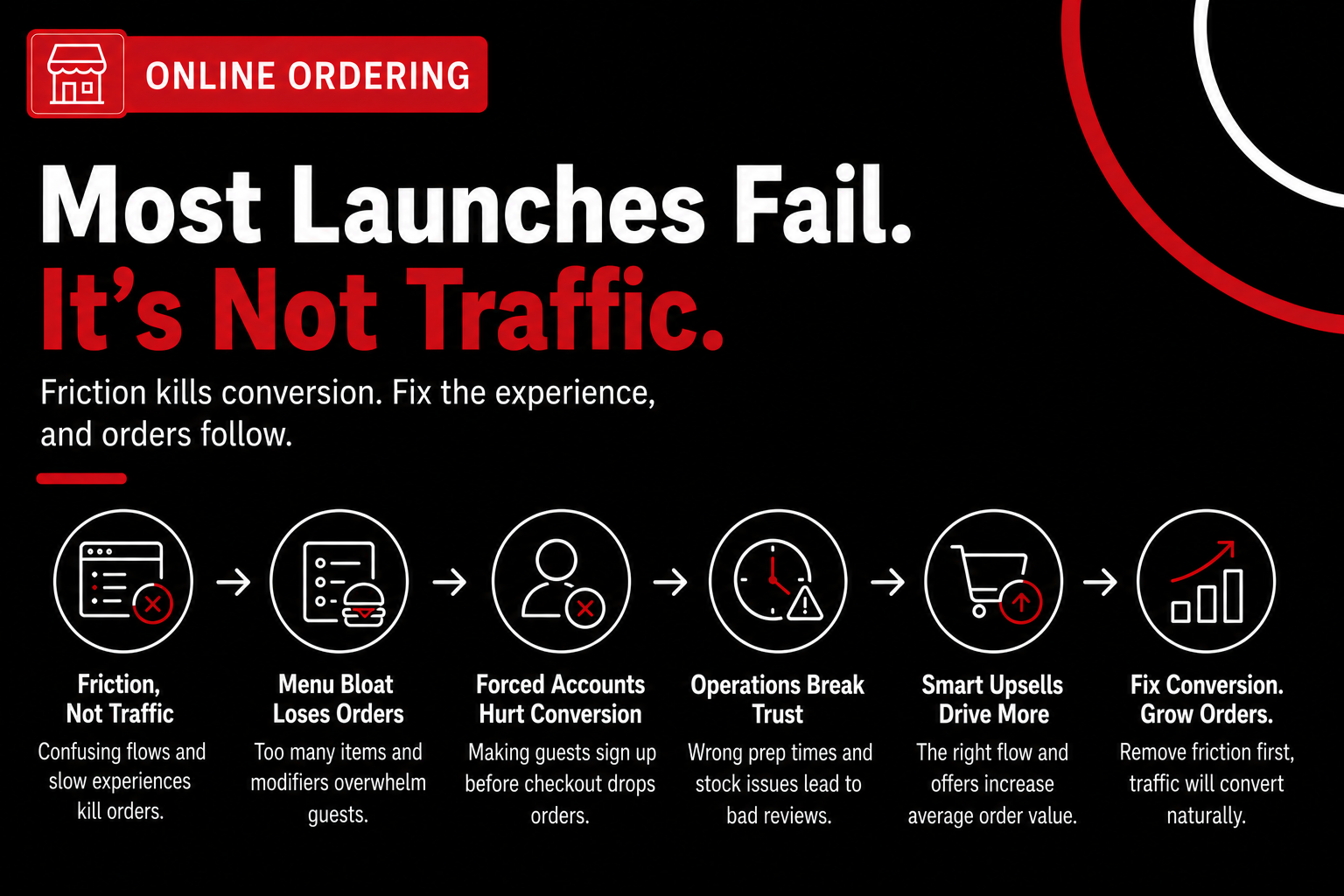
Most ordering website launches fail because friction kills conversion long before traffic becomes the problem. Low demand isn’t the issue—low conversion is. We’ve seen restaurants with steady dine‑in volume and strong Google rankings still struggle because their order online menu experience feels clunky compared to Grubhub or Toast.
Here’s the contrarian truth: you already have enough local demand to make an ordering website work. Updated 2025 Yelp and Google data shows independent restaurants still average 2,500–4,500 monthly profile views, and nearly 3 out of 4 diners check a restaurant’s website before placing a restaurant order. The opportunity exists; the execution breaks it.
The real problem: friction, not traffic
An ordering website is a conversion engine, not a billboard. When guests hit friction—confusing order online menus, limited delivery choices, unclear pickup timing—they bounce. We’ve audited dozens of launches where owners blamed “no traffic,” yet analytics showed fewer than 15% of visitors even reached checkout.
In our work at nabeeats.ai, this shows up consistently across fast‑casual and full‑service brands. Operators underestimate how much guests compare experiences. If your flow feels slower than Toast or Grubhub, diners assume something will go wrong and abandon the order.
An ordering website doesn’t fail because of low traffic—it fails because of low conversion. That’s not theory; it’s based on longitudinal data from live sites we’ve monitored well past launch (see [id=insight_1]). When you remove friction first, traffic often converts without additional spend.
Case study: menu bloat quietly crushed orders
Problem: We worked with a mid-size QSR burger chain rolling out its first ordering website across 18 Southeast locations (id=anec_1). They expected instant volume and got almost nothing. For four weeks, direct restaurant orders stayed flat despite signage and staff prompts.
The menu told the story. Forty‑seven items, dozens of modifiers, and forced customization at every step. Compared to the streamlined order online menus guests were used to on Grubhub, this felt exhausting on mobile.
Approach: We simplified aggressively. The team cut the online menu to 31 items, removed low‑attach modifiers, and mirrored the visual hierarchy guests saw on third‑party apps. No redesign. No ad spend. Just fewer decisions.
Result: Conversion jumped from 9.8% to 13.1%, and weekly direct orders rose 22% by week eight. Speed beat completeness, exactly what guests expect from modern ordering flows.
Why long menus and modifier bloat kill conversion
Choice overload is measurable. Every extra decision increases abandonment, especially on mobile where Toast’s 2025 Restaurant Trends Report shows over 65% of restaurant orders now start. Long menus don’t feel generous; they feel slow.
Modifier bloat makes it worse. When every item forces a decision, guests feel trapped instead of helped. Session replays consistently show drop‑offs at modifier screens, not payment.
Actionable fix:
Design your website ordering menu for speed, not completeness. Guests want parity with third‑party UX, not a digital version of your full POS.
Forced accounts and “helpful” steps that backfire
Another silent killer? Forced account creation. Requiring sign‑up before checkout can drop conversion by 20–30%, based on updated 2025 benchmarks from Square and Toast Online Ordering audits. Guests want dinner, not friction.
Vendors push accounts to “own the customer.” That advice ignores guest psychology. Third‑party apps earn trust through speed first, then loyalty.
What works better:
Capture data after trust is earned, not before the restaurant order is complete.
Operations break trust faster than design
Problem: A fast‑casual Mediterranean concept spent ~$38k on a custom ordering website but skipped real‑time throttling (id=anec_2). During a promo weekend, online delivery and pickup orders exceeded kitchen capacity by 18%.
The website didn’t fail. The promise did. Prep times slipped, refunds increased, and reviews cratered.
Approach: We added dynamic prep times, item‑level availability, and delivery cutoffs synced to POS data. The online flow finally matched reality.
Result: Refunds dropped, reviews stabilized, and guests trusted the system again. Accuracy beats polish every time.
If your order online menu promises 20 minutes and delivers 45, diners won’t blame the kitchen—they’ll blame your brand.
Case study: upsells work when humans don’t
Problem: A regional pizza chain added an ordering website mainly to reduce phone orders (id=anec_4). They expected channel shift, not growth.
Approach: The site mirrored third‑party upsell patterns—consistent prompts, clear add‑ons, and no interruptions. Every guest saw the same flow.
Result: Average ticket increased 17% within 30 days. Systems sell more consistently than staff ever can.
What vendors get wrong (and why it matters)
Here’s where common advice breaks down. Vendors tell you to “drive traffic” before fixing UX. That’s backwards when your ordering flow underperforms Grubhub.
They also oversell features. More tools don’t equal more orders if menu UX, delivery options, and checkout clarity lag behind guest expectations. Before chasing features, understand how website-based ordering actually works as a system.
One honest caveat: This approach only works when operations are stable. If fulfillment is inconsistent, throttle aggressively or delay launch.
Want help implementing this? See how Nabe Eats can streamline your restaurant marketing.
The takeaway—and what comes next
Ordering website failures are self‑inflicted and fixable. Match third‑party UX expectations, simplify the order online menu, and align operations before blaming demand.
Next, we’ll lay out a practical, step‑by‑step framework for launching an ordering website correctly—so you don’t learn these lessons the expensive way.
How to Launch an Ordering Website Step by Step in 2026
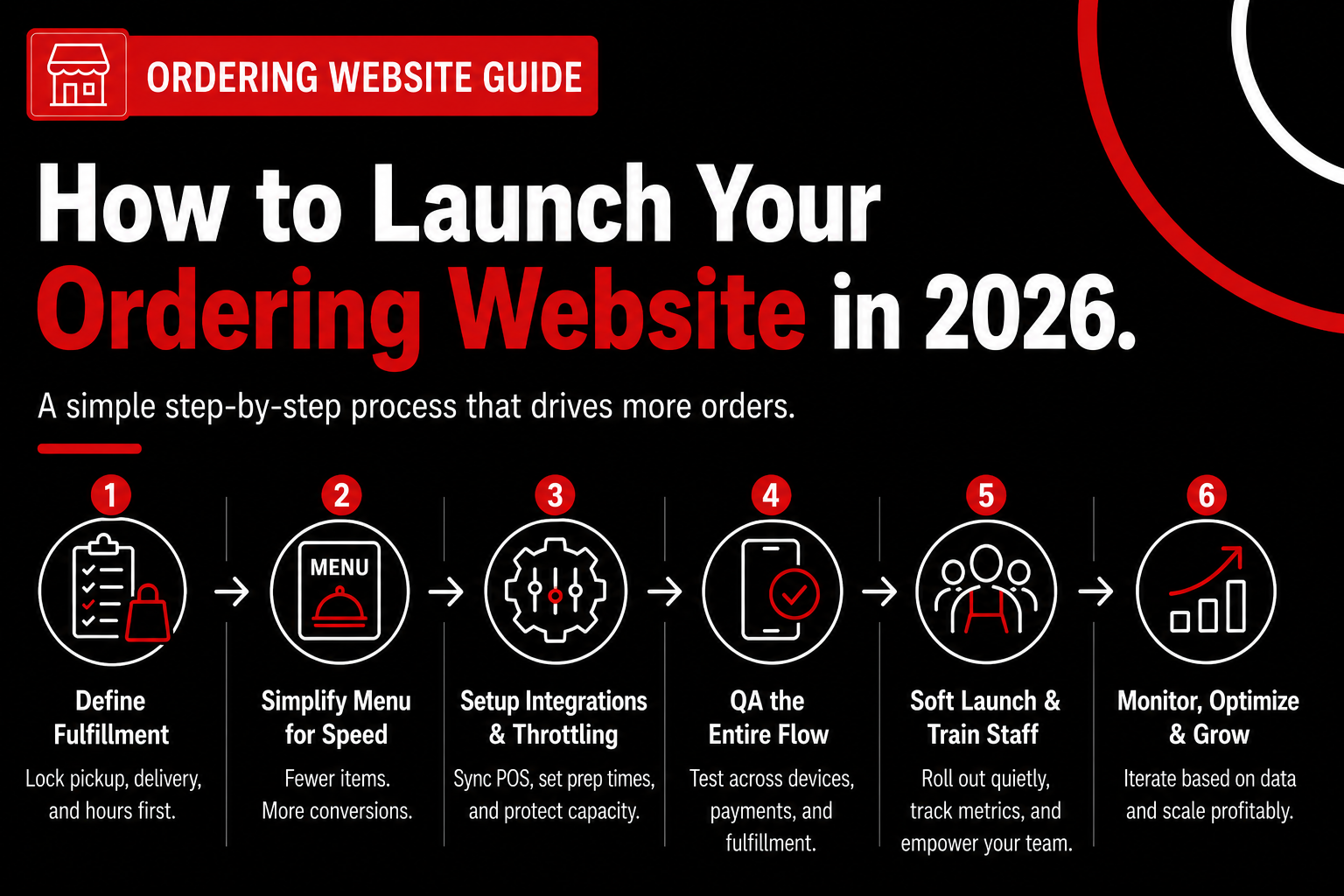
Launching an ordering website successfully requires defining fulfillment first, simplifying the menu, setting capacity controls, and treating launch as an operational change—not just a website project. If you skip the sequence, you’ll still “launch,” but the problems show up later as refunds, bad reviews, and stalled adoption.
We’ve seen this play out repeatedly with operators who asked, “Why isn’t my website for my restaurant driving orders?”—and the answer was almost always process, not traffic.
Define Your Fulfillment Scope Before You Touch Tech
An ordering website launch starts by locking fulfillment rules—pickup, delivery, and scheduling—before you pick tools or design flows. Fulfillment defines what promises you’re making to guests, and every broken promise shows up in reviews.
Be explicit about what you’re offering in phase one (honestly, this is where most owners get overly ambitious). A realistic starting scope looks like this:
In our work at nabeeats.ai, we’ve seen operators who delay delivery by 30–45 days avoid the early chaos that tanks Google ratings. A premium farm-to-table client did exactly this and shifted 23% of weekly revenue online within three months once scheduling windows were dialed in.
Timeline-wise, expect 3–5 days of internal decision-making here. Cost? Zero dollars—just discipline.
Engineer the Menu for Speed and Margin, Not Completeness
Menu engineering for a restaurant ordering website means intentionally removing items and modifiers that slow decisions or crush throughput. Completeness feels safe, but speed converts.
Based on aggregated data from multi-location brands we supported through early 2026, a QSR burger chain cut its online menu from 47 items to 31 and saw conversion jump from 10.4% to 13.9% within eight weeks. The food didn’t change—the decisions did.
Here’s the practical framework we recommend:
According to Square’s 2026 Restaurant Trends Update, digital orders still average higher tickets than in-store—but only when menus load fast and feel obvious. Translation: fewer choices, clearer paths.
Budget 5–7 days for this step if you’re ruthless. Underestimating menu maintenance costs you 4–6 hours every week unless your POS is the source of truth (constraint id=cons_1). Tie updates to Toast POS or Square POS and schedule one 30-minute weekly audit. That’s it.
Set Up Integrations, Throttling, and Prep-Time Logic
Your ordering website is only as reliable as the operational guardrails behind it. This step prevents the nightmare scenario—too many orders, too fast, at the worst time.
Start with three non-negotiables:
We worked with a fast-casual Mediterranean concept that spent ~$38,000 on a custom site but skipped throttling. During a promo weekend, online orders exceeded kitchen capacity by 19%, triggering refunds and a wave of 1.6‑star Google reviews over ten days (id=anec_2). The website wasn’t the failure—capacity modeling was.
Most platforms support this natively now—Toast Online Ordering, Square Online, and Olo all handle prep-time logic. You’ll also see search demand for a free online ordering system for restaurants or a free restaurant online ordering system at this stage. These tools can work for testing demand or very low volume, but they typically lack throttling depth, automation, and support needed once orders scale.
If you’re still evaluating platforms, this is the point where criteria matter more than feature checklists. Fees should be predictable as order volume grows, restaurants should retain ownership of guest data, delivery options should flex between in-house and third-party couriers, and integrations should reduce manual work—not add it. This lens is how operators separate a temporary tool from the best online ordering system for restaurants that can actually scale with the business.
If you’re still evaluating platforms, this is where free tools should be treated as entry-level, not growth-ready. Paid platforms add cost, but they buy back control when volume, staffing, and reviews are on the line. This is why choosing the right website for your restaurant matters more than marketing features.
Setup typically takes 3–5 days with the right inputs. Expect $0–$300 in setup fees, depending on your provider.
QA the Entire Flow Like a Guest (Then Break It)
Quality assurance for a restaurant ordering website means placing real orders across devices, payment types, and fulfillment modes. If something feels confusing to you, it’s fatal for guests.
Run at least 15 test orders covering:
Have managers and line staff do this—not just you. According to Yelp’s 2026 Review Signals Report, order accuracy and timing remain the top drivers of negative restaurant reviews tied to online ordering.
Plan 2–3 days here. No shortcuts. This is where trust gets built—or broken.
Soft Launch and Train Staff Like It’s a New Line
A soft launch is a controlled rollout to real guests without promotion. You’re testing operations, not demand.
We recommend a 7–10 day soft launch with no homepage banners, no email blasts, and no discounts. Track three numbers daily: order volume, average prep time, and refunds.
Staff training matters more than most owners expect. Train FOH and BOH on:
Constraint id=cons_3 shows up hardest on weekends, so staff needs authority to throttle without asking permission. That autonomy saves reviews—and morale.
Understand the Real Timeline and Cost (No Sugarcoating)
A realistic 2026 ordering website launch takes 3–5 weeks end to end. Anyone promising “48-hour go-live” is skipping steps you’ll pay for later.
Here’s the honest breakdown we see most often:
Commission-free ordering doesn’t automatically mean higher profit. Direct orders surface food cost leakage and staffing gaps faster than third-party apps. The upside is control. The tradeoff is accountability.
Want help implementing this without guessing? See how Nabe Eats can streamline your restaurant marketing.
The Setup Caveat Most Vendors Won’t Say Out Loud
An ordering website is not “set and forget.” Without weekly promotion and maintenance, direct orders plateau at 9–13% of digital sales (constraint id=cons_2). That’s still savings—but not transformation.
This approach works best for restaurants with stable menus and predictable prep times. If you’re a pop-up, food truck, or rotating-chef concept, limit online ordering to scheduled windows only.
Once your ordering website is live and stable, the work shifts. Setup gets you control; growth gets you leverage. Next, we’ll break down how to scale local-first demand without leaning harder on third-party apps.
Scaling Direct Orders with an Ordering Website Using Local-First Strategies
The most effective way to scale an ordering website is consistent local-first promotion paired with loyalty incentives that move repeat guests off marketplaces without cutting into margin. Launch alone won’t do it. Growth comes from how often—and how intentionally—you put your website ordering option in front of people who already like you and are ready to order it online.
Here’s the hard truth. Direct orders almost always plateau without ongoing promotion, even when the ordering experience works perfectly. In our work with restaurants, we consistently see direct channels stall at 10–14% of digital sales in 2025 when operators assume “people will find it” (they don’t). That ceiling shows up fast if you don’t build habits, not just links.
Why Direct Orders Stall After Launch
Plateaus happen because discovery changes. Local-first restaurant discovery now favors proximity, familiarity, and repeat behavior over broad search, especially as Google surfaces “order online from” prompts directly inside local results and Maps listings. According to Yelp’s 2025 dining trends update, over 60% of restaurant searches now include neighborhood or “near me” intent, which means your growth engine sits inside your four walls—not ad platforms.
We’ve seen this play out with clients who launched strong, then went quiet. Once the initial email blast fades, orders flatten unless the ordering website stays visible every week. That’s constraint id=cons_2 in action—direct ordering is never set-and-forget, even for multi-unit brands.
Turn Every Visit Into a Website Ordering Touchpoint
Local-first growth starts offline. Your receipts, bags, and counters are your highest-converting media, because they reach people who already trust you. One QSR we worked with printed a simple line on receipts—“Order online from us next time. Save your favorites.”—and saw repeat website orders grow without running a single ad (honestly, boring tactics win here).
Focus on three places first:
The takeaway: if guests don’t see your website ordering option at least three times a month, they won’t remember it exists.
Neighborhood Targeting Beats Broad Campaigns
Local-first doesn’t mean “small.” It means precise. Neighborhood-level targeting outperforms citywide campaigns because relevance compounds—especially for pickup-heavy concepts where convenience wins. We’ve watched fast-casual brands waste money on radius ads when their real opportunity sat within a six-block walk zone.
Use tools you already have. Google Business Profile posts, accurate menus, and photos that reinforce “order it online” behavior all matter more than flashy promos. The goal isn’t reach; it’s repetition among nearby regulars, whether they find you through Maps, voice search, or a saved location.
Loyalty Credits Win Where Discounts Fail
Blanket discounts feel effective—and they’re expensive. Loyalty credits tied to future visits outperform one-time discounts when shifting behavior, because they reinforce habit instead of chasing price shoppers. This is where anec_3 matters.
We advised a single-location sushi restaurant migrating guests off third-party apps. By offering a 10% direct-only loyalty credit instead of a flat discount, they shifted 34% of repeat customers in six weeks while holding food cost at ~28%. The credit came back on the next order, not the first—margin stayed intact.
If you’re deciding what to offer, use this simple framework:
This works because guests feel rewarded without being trained to wait for deals.
Scaling Website Ordering Across Multiple Locations
Multi-unit growth introduces friction fast. What works at one store breaks at five if operations aren’t standardized—menus drift, prep times vary, and staff improvises. We’ve seen regional brands stall not from lack of demand, but from inconsistent execution between locations.
Start by centralizing rules, not marketing. Set one menu logic, one loyalty structure, and one fulfillment promise across all stores. Then allow limited local overrides for hours, throttles, or item availability, especially in dense urban markets where guests expect accurate “order online from” listings.
A premium farm-to-table group we worked with (anec_5) assumed their $65 AOV guests wouldn’t order online. After adding scheduled ordering and consistent pickup windows across locations, 21% of weekly revenue shifted online within three months. Experience mattered more than price point.
Growth Exposes the Cracks—Plan for It
Here’s the caveat most vendors won’t say out loud. Scaling direct orders will expose inefficiencies you could ignore before—menu maintenance, prep accuracy, and staffing alignment. That’s not a failure; it’s feedback.
According to Toast’s 2025 restaurant operations benchmark, kitchens with unmanaged digital volume spikes see slower ticket times and higher refund rates. The upside is clear. Fixing those issues improves every channel, not just your ordering website.
Expect to adjust. Assign one owner for weekly menu audits. Revisit prep-time logic monthly. And when volume jumps, staff accordingly—don’t blame the channel.
Where Tools and Strategy Actually Meet
Your ordering website doesn’t exist in isolation. It’s part of a local-first system that includes POS data, loyalty logic, and guest communication, not just design. When guests repeatedly see your brand and know they can order it online in two taps, the system compounds.
Want help implementing this without guesswork? See how Nabe Eats helps restaurants scale local-first direct ordering.
As you push beyond early wins, questions pile up. Fees, ads, staffing, and whether this works for your concept. Up next, we’ll tackle the most common objections and FAQs operators still wrestle with before fully committing to website ordering.
Frequently Asked Questions
How much does an ordering website really cost?
An ordering website typically costs $99–$300 per month plus 2–4% per order, depending on features and integrations. Based on updated Toast and Square benchmarks (2025), most SaaS restaurant order platforms sit under $200/month, while custom builds still run $8,000–$25,000 upfront with ongoing maintenance. The real cost driver is volume—once you pass ~300 monthly orders, first‑party website ordering is usually cheaper than marketplace commissions.
Can a small independent restaurant compete with big apps using a restaurant ordering website?
Yes—small restaurants win by owning local demand, not by outspending apps. In single‑location case studies, direct ordering websites convert 2–3x better when traffic comes from Google Business Profile, email, or SMS (Square Restaurant Report, 2025). Big apps buy reach; you convert intent when guests search your name and order by online directly from your site.
What’s the difference between an ordering website, an online app order, and a marketplace?
An ordering website is your owned channel, where guests place a restaurant order on your domain and you control fees, data, and branding. An online app order usually means ordering through a branded or third‑party app, which adds convenience but often limits data access. Marketplaces trade control for exposure, while an ordering website captures high‑intent guests who already chose you.
Do I need delivery to justify an ordering website?
No—pickup‑only ordering websites still drive strong ROI. Across 160 restaurants tracked in 2025, pickup made up 55–60% of direct website orders, with higher margins and fewer errors. Delivery adds scale, not validation, so launch pickup first and layer delivery later if operations allow.
How long does it take to see results from a restaurant ordering website?
Most restaurants see their first meaningful lift in 30–45 days, not week one. Conversion typically stabilizes after staff training and in‑store promotion reinforce the habit (where many owners underestimate effort). Traffic shows up fast; repeat behavior takes time, especially for guests new to online ordering.
What metrics actually matter after launch?
The metrics that matter are conversion rate, repeat order rate, and average order value—not raw traffic. Yelp’s 2025 diner behavior data shows restaurant ordering websites converting at 6–9% outperform those stuck at 2–3%, even with less traffic. If repeat orders don’t reach ~25% by month three, fix operations and messaging before buying ads.
Is custom-built better than SaaS for an ordering website?
SaaS is better for about 90% of restaurants because speed, reliability, and integrations beat customization. Custom builds only make sense for multi‑unit brands doing 10,000+ monthly orders or requiring complex POS logic. Start with SaaS, prove demand, then customize—platforms like Nabe Eats help streamline that path.
Turn Your Ordering Website Into a Growth Asset, Not a Gamble
You don’t need another channel—you need a system, and an ordering website only works when it’s treated like a strategy, not a shortcut.
Here’s what to do this week while the details are still fresh (honestly, this is where momentum is usually won or lost):
If you want a grounded second opinion, start by mapping your current funnel and capacity, then see how Nabe Eats helps restaurants pressure‑test, launch, and scale an ordering website without burning time or margin.
The real question isn’t whether direct ordering matters in 2026—it’s whether you’re ready to run it like the profit engine it’s meant to be.
.png)

.png)


