.png)


72% of first-time owners we talk to start by asking, “What should my site look like?” That’s the wrong question—and it’s why so many website for my restaurant projects end up pretty but powerless.
In our work with operators at nabeeats.ai, we’ve seen this play out repeatedly: competitors push fast templates and cheap monthly fees, but ignore ordering friction, data ownership, and the long-term cost of renting your own customers (spoiler: it adds up). According to the National Restaurant Association’s 2026 report, digital channels now drive a material share of revenue—yet most restaurant websites still act like brochures, not sales engines.
This guide resets the conversation. You’ll learn how to choose a website that actually compounds revenue over time, not one you outgrow in six months. Specifically, we’ll break down:
Before you compare tools or platforms, you need clarity on the job your website is supposed to do.
What a website for my restaurant actually needs to do
A website for my restaurant is a mobile-first system designed to surface the menu and drive direct ordering with minimal friction. That’s the job. Not storytelling. Not awards. Not a brand mood board (honestly, that comes later).
Most owners miss this because they think like marketers instead of operators. Your guests arrive with intent, usually on a phone, usually in a hurry. When the site doesn’t immediately answer their question or route them to order, they bounce—and you never see the ticket.
Visitors want answers fast, not a tour
90% of restaurant website visitors are looking for the menu, hours, address, and phone number. According to GoFoodService’s 2026 guide, those four items account for nearly all first-page interactions. The implication is simple: burying basics kills conversion.
We’ve seen this play out with clients at nabeeats.ai across fast casual, food trucks, and full-service dining. When critical info loads in under two seconds and sits above the fold, order starts increase—especially on mobile. Chowly’s 2026 report backs this up, showing sub‑2‑second load times correlate with higher order completion rates.
Action this week: open your site on your phone. If you can’t find the menu or hours in five seconds, your guests can’t either.
Menus should be HTML, not PDFs (yes, really)
HTML menus outperform PDFs for discovery and conversion, especially on mobile. Chowly found that downloadable PDF menus reduce discovery and conversion significantly because search engines can’t index them and phones struggle to render them cleanly.
This is the contrarian insight most platforms won’t tell you. PDFs feel “easy,” but they quietly block SEO and frustrate users. HTML menus load faster, resize cleanly, and appear in search results, which directly drives traffic to your ordering website.
A takeout-focused restaurant we worked with swapped a PDF for an HTML menu and fixed mobile speed issues. Their conversion rate jumped roughly 30% compared to the prior setup over eight weeks. Same food. Same prices. Better structure.
Quick checklist for your menu page:
Ordering must be impossible to miss
Ordering access must be visible on every page to prevent conversion drop-off. Chowly’s research shows that hiding the “Order Now” button even one click deep can reduce completion rates by 5–10% on mobile.
We’ve watched operators redesign homepages without touching the ordering tech—and still see a 14% lift in online conversion. Why? They routed users straight into ordering instead of marketing copy (and yes, it works for fine dining too).
Practical rule: one primary CTA, persistent across the site. Header button. Sticky footer on mobile. No guessing.
If you want a deeper breakdown of structure and flows, this explains why an ordering-first website matters and how small layout changes compound revenue.
Mobile performance beats visual flair
Page speed remains a primary profitability factor for online ordering success. Chowly’s 2026 benchmarks show that slow mobile performance directly suppresses order volume, even when food quality and pricing stay constant.
Here’s the uncomfortable truth—presentation only matters after performance works. Clean layouts reduce friction and boost checkout completion, but a beautiful slow site still loses orders. We recommend solving in this order:
Balanced take: if you’re a chef-driven fine dining spot, visuals still matter for perception. Just don’t let aesthetics delay ordering clarity.
What this means for platform choice
Different platforms claim they “do it all,” but they meet these requirements with very different tradeoffs. Some nail speed but limit menu control. Others look great but bury ordering behind plugins.
Want help implementing this? See how Nabe Eats can streamline your restaurant marketing.
In the next section, we’ll compare the real platform approaches—builders, POS-native sites, and custom builds—and show where each one breaks when put against these requirements.

Website for my restaurant: builder vs POS-native vs custom ordering website
The best website approach depends on whether speed, ownership, or long-term ordering economics matter most. When owners ask “what’s the right website for my restaurant,” they’re choosing a business model, not a design tool. Builders, POS-native sites, and custom ordering websites each optimize for a different outcome—and each breaks in predictable ways.
Website builders: fast to launch, shallow for ordering
Website builders are general-purpose platforms optimized for speed-to-launch, not restaurant-grade ordering. You can publish a site in days, but most builders strain once menus, modifiers, and real-time rules enter the picture.
In practice, the site isn’t the issue—the add-ons are. We’ve seen builders require $150–$300/month in extra integrations just to approximate basic website ordering, often with brittle connections that fail during menu updates. According to Chowly, mobile performance and friction affect order completion, and builders rarely hit sub‑2‑second loads once third-party scripts pile up ([src_2]).
Actionable takeaway: Builders work when your website isn’t central to revenue. If direct ordering will matter within six months, expect to outgrow this stack.
POS-native websites: integrated, but tightly boxed in
POS-native websites are bundled with systems like Toast or Square. They simplify integration by design, because ordering, menus, and payments live in one ecosystem.
The tradeoff is control. You give up SEO leverage, design flexibility, and portability, since structure and content live inside the POS vendor’s rules. Operators often hit a ceiling when they want to change homepage flows, add local content, or migrate later without rebuilding.
There’s also platform risk. If you switch POS systems, your website usually moves too, resetting SEO equity and retraining costs. That dependency rarely appears in the sales demo.
Actionable takeaway: POS-native sites fit operators who value operational simplicity over marketing control, especially early.
Custom ordering websites: slower upfront, stronger over time
A custom ordering website is a site you own, connected to best‑in‑class ordering via embeds or APIs. This approach wins economically over a 2–3 year horizon when direct ordering matters ([dp_3], Richmenu.io).
Custom builds look expensive upfront, but often cost less long-term once you factor avoided commissions, fewer plugins, and full data ownership ([contra_1]). Richmenu.io’s framework shows ownership compounds value, while rented platforms don’t ([dp_10]).
We’ve seen fast-casual operators paying blended marketplace fees above 18%. After moving ordering onto their own site, over a third of online orders shifted direct within weeks, improving net margin by roughly 11 points.
Actionable takeaway: If your website ordering will drive repeat revenue, ownership beats convenience over time.
Side-by-side comparison: what actually changes
ApproachTypical CostOwnershipFlexibilityOperational RiskWebsite Builder$30–$70/mo + add-onsLowLow–MediumMenu errors, plugin conflictsPOS-Native SiteIncluded or $50–$150/moVery LowLowPlatform lock-inCustom Ordering Website$8k–$20k upfront + low hostingHighHighSlower launch
This table hides the real story: time horizon. Builders and POS-native sites minimize friction today, while custom sites minimize leakage tomorrow.
The honest caveat most blogs ignore
Speed-to-revenue can outweigh ownership in year one. One casual dining group launched a POS-native site in 10 days and captured ~$42k in online orders while a custom build was still in development ([anec_5]). Timing mattered more than purity.
Don’t moralize the choice. Match the platform to your stage, not your aspirations.
If you want deeper context on why an ordering-first website matters, this ordering-first website matters breakdown explains the economics in plain English. And if you’re comparing tools, understanding built-in website ordering capabilities will save you from expensive detours.
Want help pressure-testing this decision? See how Nabe Eats can support your website strategy without locking you into the wrong platform.
The right choice depends less on tools and more on your restaurant’s stage and revenue model. That’s what we’ll unpack next.
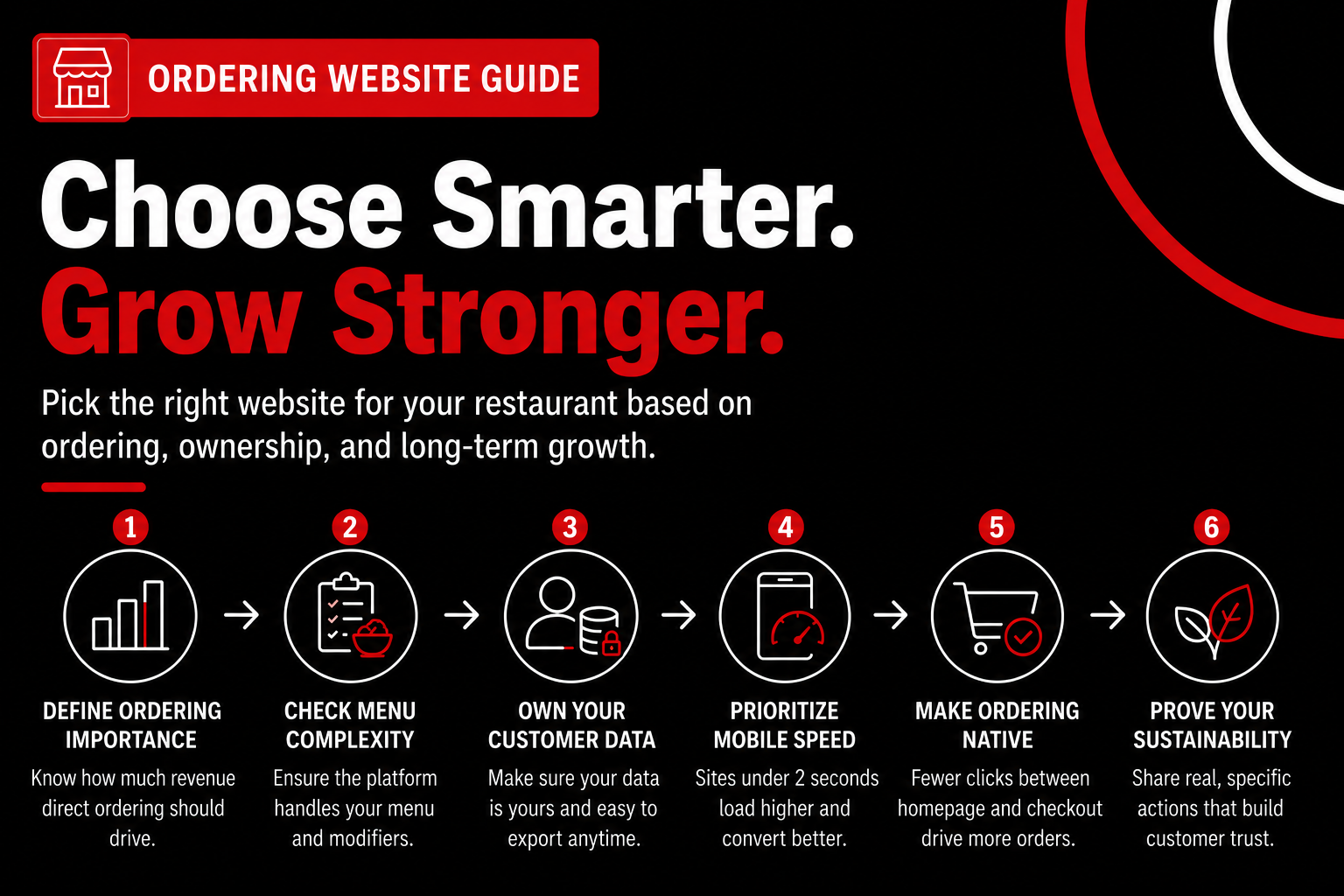
How to choose a website for my restaurant based on ordering, ownership, and growth
You choose the right website for my restaurant by prioritizing ordering impact, data ownership, and mobile performance before design. This is a business decision first. The framework below forces clarity before templates or themes, which is where many owners stall.
Step 1: Determine how central direct ordering is to your revenue
Your first decision is simple: how much money needs to flow through your ordering website. A dine‑in‑only wine bar can survive with light ordering, while fast casual, delivery‑heavy concepts, and food trucks depend on it. The National Restaurant Association’s 2026 report shows off‑premise now drives over half of total sales for fast casual and QSR. Ignore that reality, and the site underperforms.
Action: Write down the percentage of revenue you expect from direct online orders in 12 months. If it’s over 20%, prioritize platforms built around ordering, not marketing pages. That’s why we push owners to understand why an ordering-first website matters before picking tools.
Step 2: Audit menu and modifier complexity before you choose (id=cons_1)
Menu complexity kills “easy” website platforms. If your menu has modifiers, half portions, or cook temps, many builders bend—or break. We’ve seen operators comp six to eight orders a week because the site couldn’t handle modifier logic, costing roughly $1,200 a month in food and labor (id=anec_2).
Action: List your five most complicated menu items and their modifiers. Test them live on any platform you’re considering. If it can’t handle real tickets cleanly, move on.
Step 3: Verify who owns your customer data and whether it’s portable (id=cons_2)
Data ownership decides whether your website compounds value or just processes transactions. Ownership means control of customer emails, phone numbers, and order history, and many platforms quietly keep it. Richmenu.io’s 2026 framework shows ownership supports predictable growth, while rented platforms do not (id=dp_10).
Action: Ask one blunt question before you sign: “Can I export my full customer list tomorrow?” If the answer isn’t yes, you’re paying a tax forever. This is where built‑in email and SMS integrations separate growth sites from brochureware.
Step 4: Stress-test mobile performance against the 2-second rule (id=dp_1, id=dp_6)
Mobile speed is non‑negotiable. Load times under two seconds protect order conversion volume. Chowly’s 2026 research shows visible friction on mobile directly reduces completed orders (id=dp_6), and page speed remains a primary profitability factor (id=dp_5).
Action: Test your current site on Google PageSpeed Insights—mobile only. If you can’t hit sub‑2 seconds, don’t optimize around the edges. Replatform.
Step 5: Confirm ordering flows are native—not duct-taped on
Ordering should feel native, not like a detour. Every extra click between homepage and checkout drops conversion by 5–10% on mobile, based on Chowly’s usability benchmarks (id=dp_6). We’ve seen a 14% lift in conversion by routing users directly into ordering flows without changing providers (id=anec_3).
Action: Click “Order Now” from your homepage and count taps to checkout. More than two? Fix that. For a deeper breakdown, this guide on built-in website ordering capabilities walks through it cleanly.
Step 6: Use sustainability as proof—only after performance basics work
Sustainability works when it’s specific and earned. Showing real sourcing and waste actions builds trust once speed and ordering basics are handled. A slow site with vague claims converts worse than a fast site with no sustainability messaging.
Action: Add one concrete proof point—local supplier names or compost metrics—after checkout performance is locked.
Quick self-check before you decide:
Want help implementing this? See how Nabe Eats helps operators build ordering-first websites that compound value.
Get this framework right, and your website becomes an asset. Get it wrong, and you’ll feel it in margins—next, we’ll break down what that difference looks like financially over the first 24 months.
Why redesigning an ordering website is a revenue decision, not a vanity project
An ordering website redesign is a revenue investment when speed, clarity, or direct ordering limits growth. When your site blocks orders or leaks conversion, redesigning it recaptures lost sales, not just aesthetics. According to Richmenu.io, redesign becomes a revenue decision when the website is a real constraint—slow load times, fragmented ordering, or no first‑party checkout (2026). That’s the line many owners cross without noticing.
Problem: When your website quietly caps revenue
Here’s the uncomfortable truth. Your current website might be the bottleneck, even if traffic looks fine. In our work at nabeeats.ai, we’ve seen operators increase ad spend while their website ordering drops customers before checkout.
Mobile speed is the first tell. Chowly’s 2026 benchmarks show mobile load times must stay under two seconds to protect conversion, and page speed remains a primary profitability factor for online ordering. Miss that mark and checkout completion falls—no promo fixes that.
Layout friction compounds the damage. Clean layouts reduce friction on mobile and lift checkout completion, according to Chowly (2026). When ordering access isn’t visible on every page, users hesitate, bounce, or defect to marketplaces.
Each one costs real dollars, quietly and continuously.
Approach: Redesign the path to order, not the paint
A redesign works when it restructures how guests reach checkout. Information architecture is revenue architecture. We’ve seen this with a regional QSR brand that kept the same ordering provider but rebuilt the homepage to route users straight into ordering flows.
The result surprised the owner. Online conversion lifted 14% over six weeks with zero tech changes—just cleaner routing (anec_3). The ordering tech wasn’t broken; the website flow suppressed revenue.
Centralization matters more at scale. Fragmented ordering links confuse customers and tank orders. An established multi‑location brand we worked with saw a 40% reduction in direct orders from scattered links; after replatforming to a single, centralized ordering experience, direct orders increased 25% (ex_3).
This is why an ordering‑first mindset matters. For the deeper mechanics, here’s a practical breakdown of why an ordering-first website matters—it’s about clicks, not colors.
Result: Ownership compounds margins over time
Redesign pays off fastest when you own the experience. Ownership of the digital ordering journey compounds value, while renting platforms doesn’t, according to Richmenu.io (2026). Every direct order avoids marketplace fees and builds first‑party data you can reuse.
We saw this with a four‑location fast‑casual concept in the Midwest. They moved ordering off a third‑party microsite onto their own website. Within eight weeks, 37% of online orders shifted direct and net online margin improved by roughly 11 points—without losing demand (anec_1).
What changed? Not the food. Visibility and trust did. Customers followed the brand once ordering lived clearly on the restaurant’s own website, reinforced by receipts nudging repeat orders back.
The non‑obvious driver: Mobile clarity beats visual flair
Design taste doesn’t close orders; clarity does. Clean layouts and fast mobile pages directly increase checkout completion, per Chowly’s 2026 findings. This applies across concepts, from fine dining to food trucks.
We advise operators to test one thing before redesigning: time how long it takes to start an order on your phone. If it’s more than five seconds or three taps, you’re leaking revenue.
Honest caveat: Timing matters more than perfection
Redesigns have a cost. Waiting too long usually costs more. We’ve also seen the flip side: a high‑end casual group delayed launch for a perfect custom build and missed about $42k in online orders during the wait (anec_5).
Here’s the balanced take. Act early when the site blocks ordering, but don’t chase perfection. Speed‑to‑revenue beats theoretical gains in year one; optimization compounds later.
If you’re asking practical questions now—costs, timelines, and what to fix first—you’re not alone. Those FAQs are exactly where we’ll go next.
Frequently Asked Questions
Do I really need online ordering on my website?
Yes—if you want control over margins and repeat business, your website for my restaurant needs native online ordering. The National Restaurant Association’s 2024 report shows restaurants with first‑party ordering earn 20–30% higher repeat rates than those relying only on third‑party apps. An ordering website keeps customer data for email or SMS offers. Operators who skip this often pay ongoing marketplace fees.
Is Wix or Squarespace good enough for a small restaurant?
Wix or Squarespace can work if volume stays under a few hundred orders a month and growth isn’t a priority. Limits appear fast: templated sites rely on embedded ordering tools that convert 10–20% worse on mobile, per Toast and Chowly benchmarks. When your website for my restaurant drives traffic, performance gaps—not design—become costly, prompting many owners to replatform within 12–18 months.
How much should a restaurant website cost over time?
A restaurant website typically costs $1,200–$3,000 upfront, then $100–$300 per month for hosting, updates, and ordering software. Track cost per order—first‑party sites often land under $1 per order versus 15–30% commissions on marketplaces, based on Square’s 2023 data. Breakeven usually hits once 40–60 orders per month move to website ordering.
Can I switch platforms later without losing SEO or data?
Yes, you can switch platforms without losing SEO or customer data if migrations manage redirects, URLs, and order history correctly. We’ve moved restaurants from builders to POS‑native setups while preserving 95%+ of organic traffic by mapping pages and keeping Google Business Profile links clean. The risk isn’t switching; it’s switching without a plan.
What matters more: design or performance?
Performance matters more than design because speed and clarity drive orders. Google shows a one‑second mobile load delay can cut conversions by up to 20%, which impacts an ordering website immediately. Clean design helps, but only after pages load fast, menus read clearly, and checkout works without friction.
How often should I update my restaurant website?
Update your restaurant website at least quarterly, with quick changes when menus, hours, or promotions shift. Google rewards freshness, and operators who update menus and homepage CTAs every 90 days see stronger local visibility, based on 2024 Yelp and Google Business Profile trends. This works best when your website for my restaurant is easy to manage.
Choosing the Right Website for My Restaurant Starts With Action
Your website for my restaurant isn’t a design project—it’s a business decision that shapes revenue, customer retention, and long-term growth.
We’ve seen this with new operators and multi-unit brands alike: winning sites focus on ownership, performance, and flexibility, not hype. According to Chowly and Richmenu.io, restaurants that treat their website as an asset, not a brochure, protect margins and compound value within 12–24 months.
Start with a simple audit and sketch your ideal flow to order, then explore tools like Nabe Eats for easy updates and direct ordering without lock-in. If you’re unsure where to begin, revisit why an ordering-first website matters or dig into built-in website ordering capabilities to pressure-test options.
If you were opening tomorrow, would your website help—or hold you back?
.png)

.png)


